Pipeline Resolution
Pipeline Resolution provides a guided workflow for investigating and resolving failed pipelines using Metis AI-assisted analysis.
It combines pipeline observability with Metis to help you understand why a pipeline failed, identify the files that may require changes, review the recommended resolution, and validate the fix.
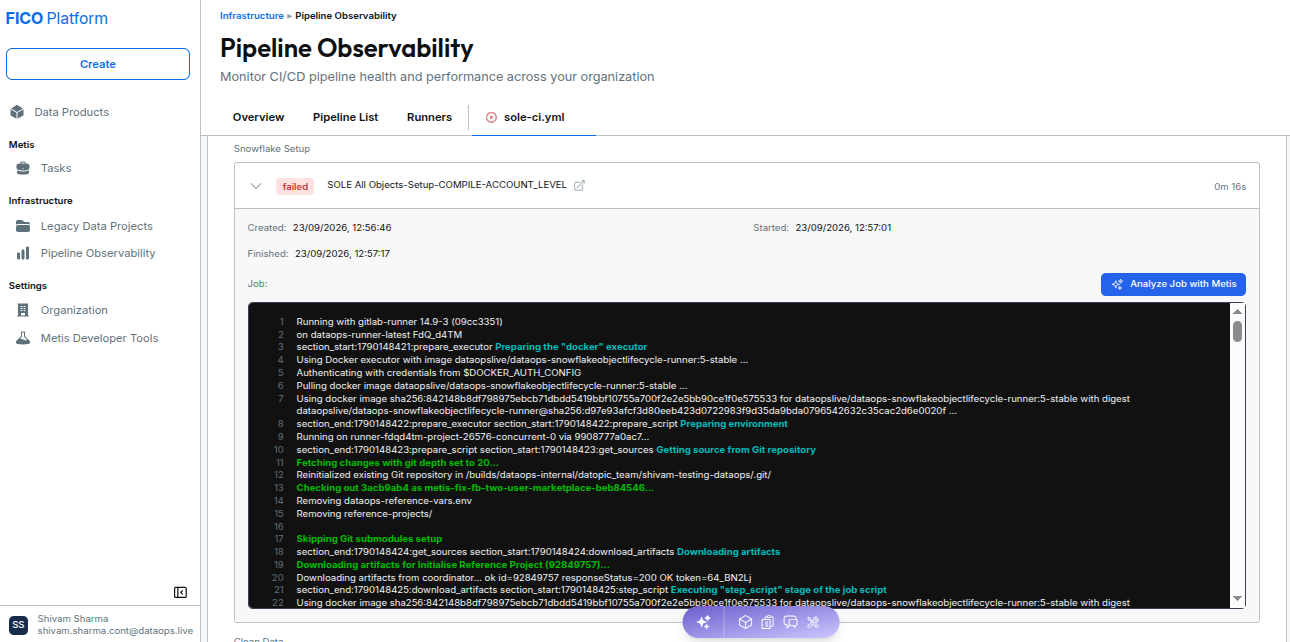
Pipeline Resolution Workflow
The resolution process consists of four main stages:
| Stage | What happens |
|---|---|
| Detect | Identify the failed pipeline and open the failed job from Pipeline Observability. |
| Diagnose | Use Metis to analyze the job logs, identify the failure root cause, and determine the relevant project files. |
| Resolve | Review the proposed changes and apply the recommended fix to the project. |
| Validate | Complete the resolution through the Merge Request and trigger a new pipeline to confirm that the failure has been resolved. |
Pipeline Resolution Capabilities
Pipeline Resolution helps you perform the following activities:
- Analyze failed pipelines using Metis.
- Review job logs and failure information.
- Identify the root cause of the pipeline failure.
- Identify candidate files that may need to be updated.
- Review the proposed resolution before applying changes.
- Apply the recommended fix through the Metis Agent.
- Create a Merge Request containing the changes.
- Validate the resolution by running a new pipeline.
Using Pipeline Resolution
The Pipeline Resolution workflow starts from Pipeline Observability.
- Open the failed pipeline.
- Select the failed job.
- Start the Analyze with Metis workflow.
- Review the failure analysis and proposed resolution.
- Confirm the changes and choose Apply Directly or Apply via Feature Branch.
- Review and merge the generated Merge Request.
- Trigger a new pipeline.
- Verify that the pipeline completes successfully.
Review the proposed changes carefully before creating the Merge Request. AI-generated recommendations should always be validated against the project context.
Detailed Pipeline Resolution Guide
For the complete step-by-step procedure, including screenshots and detailed instructions for analyzing failures, reviewing proposed fixes, applying changes, and validating the resolution, see: