Pipeline Graph Styling
As described in the DataOps Pipeline Overview, graph styling aims to effectively describe the role and function of each pipeline job at a glance. As a result, DataOps includes several features such as pipeline graph icons, graph borders, and graph font colors.
Pipeline graph icons
You can add the icon tag to your pipeline graph. The following code snippet demonstrates how the icon tag supports image URLs, project paths, and variables.
build:
  stage: build
  script:
    - echo "Building..."
  icon: "https://cdn.iconscout.com/icon/free/png-512/discord-3-569463.png" # using an image URL

test:
  stage: test
  script:
    - echo "Testing..."
  icon: "/assets/icons/favicon.ico" # using an asset path

sample:
  stage: .post
  script:
    - echo "Post Script..."
  icon: ${MY_ICON} # using a variable
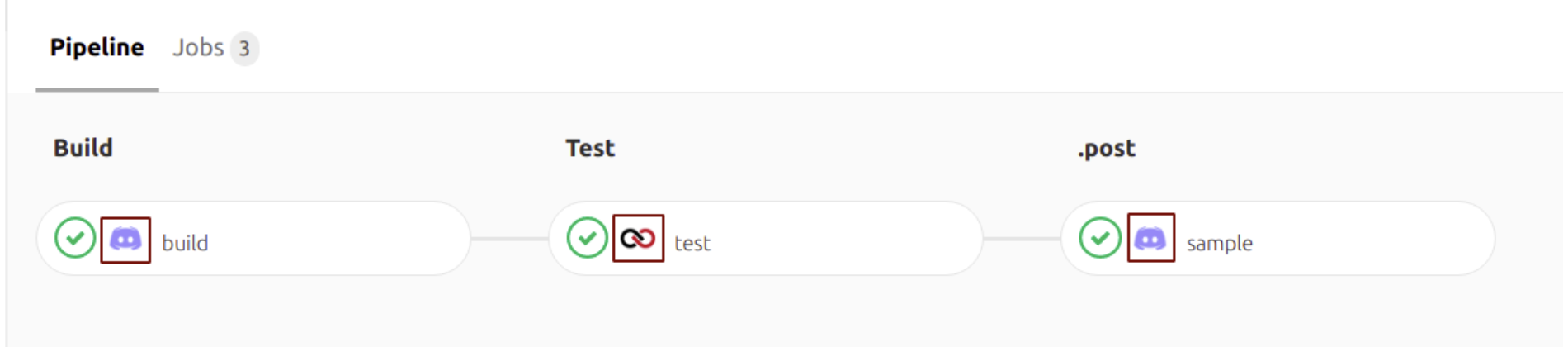
DataOps provides a set of icons in the reference project as variables. Examples include ${SNOWFLAKE_ICON}, ${VAULT_ICON}, or ${MATILLION_ICON}. Refer to the full list of icons for common data vendor choices.
Pipeline graph icon styles
Job icons are customizable. You can add any colored background to an icon by setting the icon_background_color property. If the disable_icon_background property is set to true, DataOps will ignore the background color.
The icon_background_color property supports CSS colors in any CSS format, including hard-coded, hex, or rgba and is defined in YAML as follows:
variables:
  MY_ICON: "https://cdn2.iconfinder.com/data/icons/font-awesome/1792/phone-512.png"
  BackgroundRadius: '5px'

stages:
  - Development

develop:
  stage: Development
  ...
  icon: ${MY_ICON}
  icon_background_color: "grey"
  icon_background_radius: ${BackgroundRadius}

Once the disable_icon_background property is set to true, the icon will not have any background color, and the icon_background_color property will be ignored as follows:
variables:
  MY_ICON: "https://cdn2.iconfinder.com/data/icons/font-awesome/1792/phone-512.png"
  BackgroundRadius: '5px'

stages:
  - Development

develop:
  stage: Development
  ...
  icon: ${MY_ICON}
  icon_background_color: "grey"
  icon_background_radius: ${BackgroundRadius}
  disable_icon_background: true

The job icon radius is also customizable using the icon_background_radius property. This property supports CSS radius property style formats like "15px 50px 30px 5px" or "5px 50px" and is defined in YAML as follows:
variables:
  MY_ICON: "https://cdn2.iconfinder.com/data/icons/font-awesome/1792/phone-512.png"
  BackgroundRadius: '5px'

stages:
  - Development

develop:
  stage: Development
  ...
  icon: ${MY_ICON}
  icon_background_color: "grey"
  icon_background_radius: ${BackgroundRadius}
Pipeline graph style customizations
Pipeline graph borders
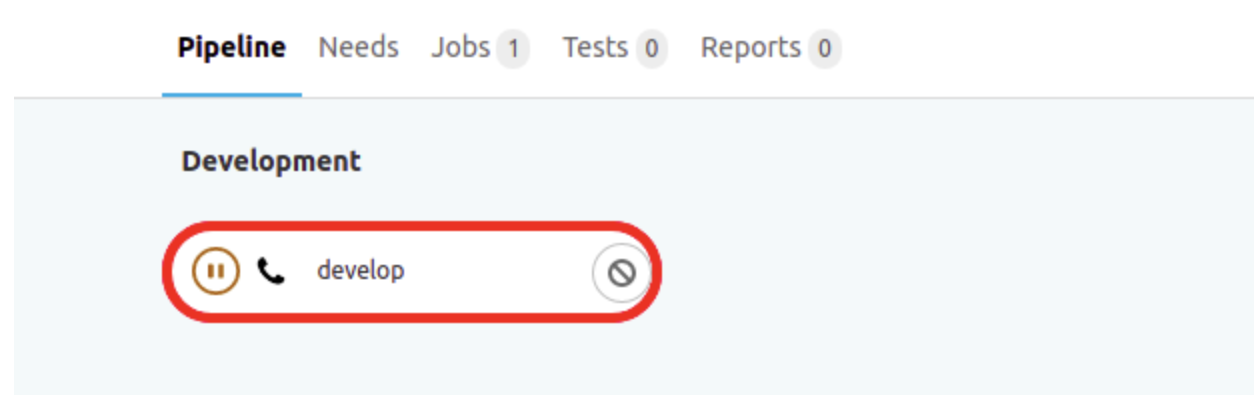
If you want to customize a job's borders, you can use border_color and border_width. These properties support CSS colors in any CSS format like hard-coded, hex, or rgba and are defined in YAML as follows:
develop:
  stage: Development
  ...
  border_color: 'red'
  border_width: 'thick'
Pipeline graph font colors
You can also add a font color to a job by using the font_color property. This property supports CSS colors in any CSS format like hard-coded, hex, or rgba and is defined in YAML as follows:
stages:
  - Development

develop:
  stage: Development
  ...
  font_color: "purple"

Pipeline graph background colors
You can add a background color to a job using the background_color property. This property supports CSS colors in any CSS format like hard-coded, hex, or rgba and is defined in YAML as follows:
variables:
  MY_ICON: "https://cdn2.iconfinder.com/data/icons/font-awesome/1792/phone-512.png"
  BACKGROUND_COLOR: 'grey'

stages:
  - Development

develop:
  stage: Development
  ...
  icon: ${MY_ICON}
  background_color: ${BACKGROUND_COLOR}
