Fivetran Orchestrator
Professional Enterprise
| Image | $DATAOPS_FIVETRAN_RUNNER_IMAGE |
|---|
The Fivetran orchestrator allows a DataOps pipeline to interact with Fivetran as a job in a DataOps pipeline, triggering a Fivetran operation such as ingesting data from a Fivetran pipeline.
Usage
A typical Fivetran orchestrator workflow is as follows:
-
If
FIVETRAN_ACTIONhas one ofSTATUS,START,TESTorFORCE_RESYNC, one of the following actions occurs:- Attempt to update the connector
schedule_typeto manual ifFIVETRAN_DONT_DISABLE_SYNChas no value. If this fails, a warning is logged and you may need to manually change the schedule type - If set to
STATUS, print the JSON response in the console - If set
START, log the connector's final status - If set to
TEST, log the summary of tests passed or failed - If set
FORCE_RESYNC, log the connector's final status
- Attempt to update the connector
Connector ID
Fetch the Fivetran Connector ID for the Fivetran orchestrator to work. To do so:
-
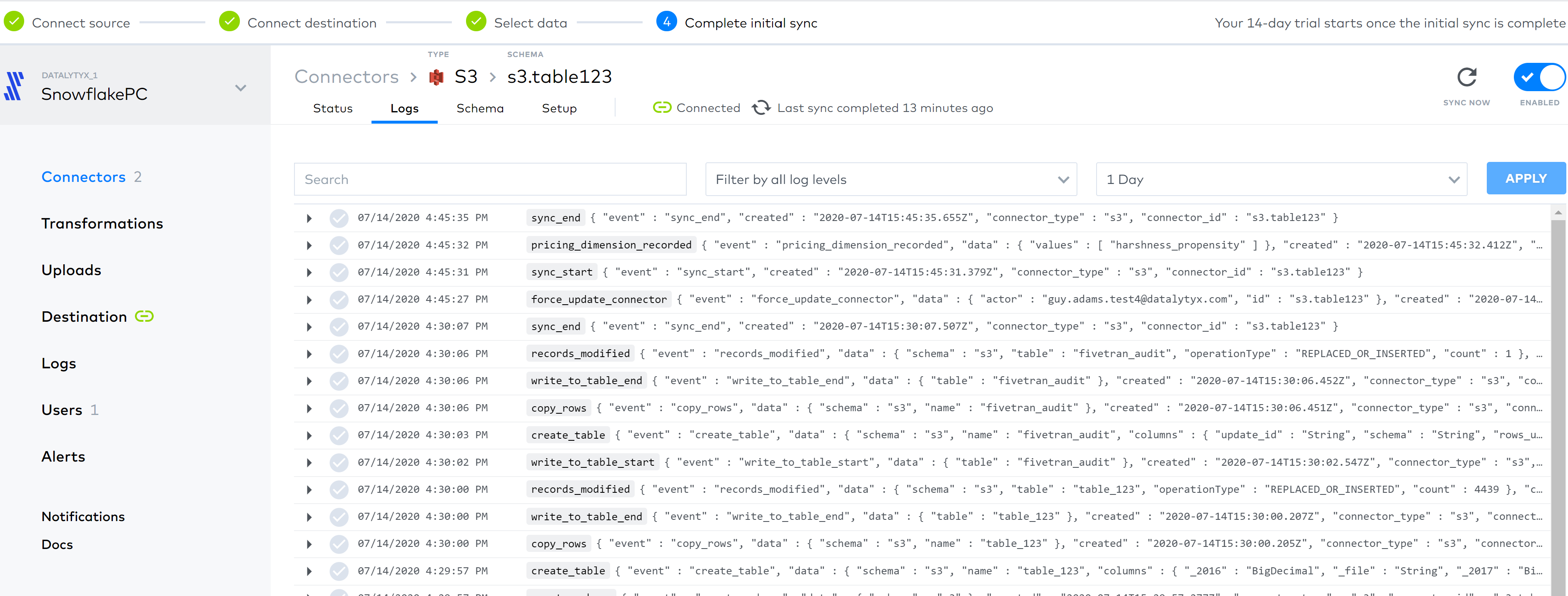
Go to your connector instance in the Fivetran User Interface (UI).
-
Search for an event of type
api_call.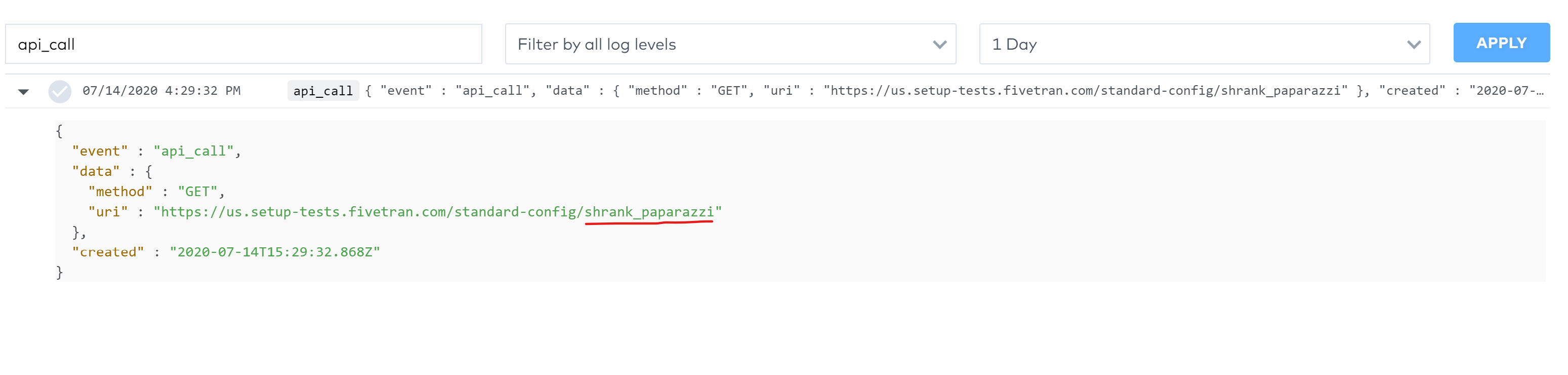
The string after the standard-config is the Connector ID, shrank_paparazzi in the example given.
See the Fivetran REST API Group Management Docs for more information.
Connecting to Fivetran
To connect to Fivetran API services, you need to generate API keys. You can use these API keys in the following two ways:
API keys saved in DataOps vault at a specific path
-
Save the API key and API secret in the DataOps Vault at the paths FIVETRAN.DEFAULT.API_KEY and FIVETRAN.DEFAULT.API_SECRET respectively.
FIVETRAN:
  DEFAULT:
    API_KEY: "XXXXXXXXXX"
API_SECRET: "XXXXXXXXXXXXXXXXXXXX" -
Set the pipeline/job variable
SET_FIVETRAN_KEYS_TO_ENVto retrieve the values from the vault and use them in the Fivetran ingestion job.
API keys saved in DataOps vault at any path
-
Save the API key and API secret in the DataOps Vault at any path.
INGESTION:
  FIVETRAN:
    PROD:
      API_KEY: "XXXXXXXXXX"
API_SECRET: "XXXXXXXXXXXXXXXXXXXX" -
Set values in the variables
FIVETRAN_API_KEYandFIVETRAN_API_SECRETfollowing the DATAOPS_VAULT functionality."fivetran-orchestrator Ingestion Start":
variables:
FIVETRAN_ACTION: START
CONNECTOR_ID: splint_shopkeepers
FIVETRAN_API_KEY: DATAOPS_VAULT(INGESTION.FIVETRAN.PROD.API_KEY)
FIVETRAN_API_SECRET: DATAOPS_VAULT(INGESTION.FIVETRAN.PROD.API_KEY)
Supported parameters
| Parameter | Required or Optional (and default) | Description |
|---|---|---|
FIVETRAN_ACTION | REQUIRED | Must be one of STATUS, START, TEST or FORCE_RESYNC |
CONNECTOR_ID | REQUIRED | Identifier for the connector. See the Get Connector ID section for fetching the connector ID. |
SET_FIVETRAN_KEYS_TO_ENV | REQUIRED if default DataOps Vault paths are used | If a value is set to this variable, values for FIVETRAN_API_KEY and FIVETRAN_API_SECRET are fetched from the vault with the vault keys FIVETRAN.DEFAULT.API_KEY and FIVETRAN.DEFAULT.SECRET respectively. See API keys saved at a specific path for more info. |
FIVETRAN_API_KEY | Optional | Fivetran API access token (see the Fivetran docs). Note: This parameter becomes required if you don't set SET_FIVETRAN_KEYS_TO_ENV. |
FIVETRAN_API_SECRET | Optional | Fivetran API access token (see the Fivetran docs). Note: This parameter becomes required if you don't set SET_FIVETRAN_KEYS_TO_ENV. |
TABLE | REQUIRED in FORCE_RESYNC action | Name of the table to force resync |
SCHEMA | REQUIRED in FORCE_RESYNC action | Name of the schema to force resync |
FIVETRAN_DONT_DISABLE_SYNC | Optional | If a value is set to this variable, schedule_type will not be updated to manual. If not set, the orchestrator will attempt to update schedule_type to manual, and log a warning if this fails (requiring manual intervention via the Fivetran API) |
FIVETRAN_TIMEOUT | Optional. Defaults to 300 seconds | Time in seconds to wait for the completion of the Fivetran job, after which the operation will fail. We recommend you put a higher value if you have a large data volume to avoid a false positive failure where the system only needs some more time to complete the operation. |
FIVETRAN_POLLING_INTERVAL | Optional. Defaults to 5 seconds | Time in seconds between polling requests when checking the status of a running Fivetran job. |
Example jobs
The following four examples describe the most common uses of the Fivetran orchestrator:
1. Check the connector status
This example sends a request to the Fivetran pipeline to check its connector status and prints the JSON response on the console.
"Fivetran Connector Status":
  extends:
    - .agent_tag
  stage: "Check Status"
  image: $DATAOPS_FIVETRAN_RUNNER_IMAGE
  variables:
    FIVETRAN_ACTION: STATUS
    FIVETRAN_API_KEY: <your key here or in the DataOps Vault>
    FIVETRAN_API_SECRET: <your secret here or in the DataOps Vault>
    CONNECTOR_ID: <your connector id>
  script:
    - /dataops
  icon: ${FIVETRAN_ICON}
2. Start a connector
This example sends a request to Fivetran to start the specified connector.
"Fivetran Connector Start":
  extends:
    - .agent_tag
  stage: "Start Connector"
  image: $DATAOPS_FIVETRAN_RUNNER_IMAGE
  variables:
    FIVETRAN_ACTION: START
    FIVETRAN_API_KEY: <your key here or in the DataOps Vault>
    FIVETRAN_API_SECRET: <your secret here or in the DataOps Vault>
    CONNECTOR_ID: <your connector id>
  script:
    - /dataops
  icon: ${FIVETRAN_ICON}
3. Test the connector
This example sends a request to Fivetran to test the specified connector.
"Fivetran Connector Test":
  extends:
    - .agent_tag
  stage: "Test Connector"
  image: $DATAOPS_FIVETRAN_RUNNER_IMAGE
  variables:
    FIVETRAN_ACTION: TEST
    FIVETRAN_API_KEY: <your key here or in the DataOps Vault>
    FIVETRAN_API_SECRET: <your secret here or in the DataOps Vault>
    CONNECTOR_ID: <your connector id>
  script:
    - /dataops
  icon: ${FIVETRAN_ICON}
4. Force resync of a specific table
This example requests Fivetran to force-resync the table specified in the YAML config file.
"Fivetran Connector Force Resync":
  extends:
    - .agent_tag
  stage: "Force Resync Table"
  image: $DATAOPS_FIVETRAN_RUNNER_IMAGE
  variables:
    FIVETRAN_ACTION: FORCE_RESYNC
    FIVETRAN_API_KEY: <your key here or in the DataOps Vault>
    FIVETRAN_API_SECRET: <your secret here or in the DataOps Vault>
    CONNECTOR_ID: <your connector id>
    TABLE: <table name>
    SCHEMA: <schema name>
  script:
    - /dataops
  icon: ${FIVETRAN_ICON}