Roles and Permissions
DataOps roles
Users' roles in the data product platform determine what permissions users have on projects, project features, and groups. DataOps interacts with the below primary roles:
- Reporter: A read-only contributor who can't write in the repository but can on issues.
- Developer: A direct contributor with full access unless something has been explicitly restricted.
- Maintainer: A super-developer who can commit to the main branch and deploy to production.
- Owner: A person with all permissions available only for group owners and administrators.
You can see the DataOps roles by navigating to the group or project information and selecting Members.
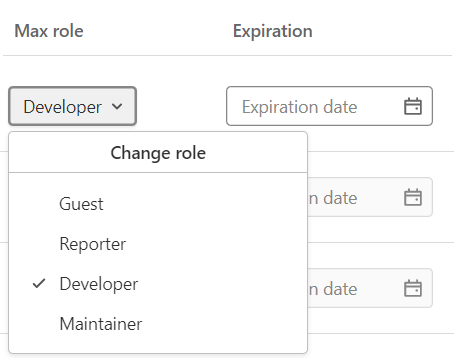
When you add a user to a project or group, you assign them a role. The role determines which actions they can take on the group or project. The highest role is used if a user is in a project's group and the project itself.
User permissions
Users in DataOps are assigned permissions based on different levels of access. The following sections provide details for permissions at each level.
Repository permissions
| Action | Reporter | Developer | Maintainer | Owner |
|---|---|---|---|---|
| View repository analytics | Yes | Yes | Yes | Yes |
| Pull project code | Yes | Yes | Yes | Yes |
| View project code | Yes | Yes | Yes | Yes |
| View a commit status | Yes | Yes | Yes | Yes |
| Add tags | No | Yes | Yes | Yes |
| Create new branches | No | Yes | Yes | Yes |
| Create or update commit status | No | Yes | Yes | Yes |
| Force push to non-protected branches | No | Yes | Yes | Yes |
| Push to non-protected branches | No | Yes | Yes | Yes |
| Remove non-protected branches | No | Yes | Yes | Yes |
| Rewrite or remove Git tags | No | Yes | Yes | Yes |
| Enable or disable branch protection | No | No | Yes | Yes |
| Enable or disable tag protection | No | No | Yes | Yes |
| Push to protected branches | No | No | Yes | Yes |
| Turn on or off protected branch push for developers | No | No | Yes | Yes |
| Remove fork relationship | No | No | No | Yes |
| Force push to protected branches | No | Yes | No | No |
| Remove protected branches | No | No | No | No |
Merge requests permissions
| Action | Reporter | Developer | Maintainer | Owner |
|---|---|---|---|---|
| View analytics | Yes | Yes | Yes | Yes |
| Assign reviewer | Yes | Yes | Yes | Yes |
| Apply code change suggestions | No | Yes | Yes | Yes |
| See list | Yes | Yes | Yes | Yes |
| Approve | No | Yes | Yes | Yes |
| Assign | No | Yes | Yes | Yes |
| Create | No | Yes | Yes | Yes |
| Add label | No | Yes | Yes | Yes |
| Lock thread | No | Yes | Yes | Yes |
| Manage or accept | No | Yes | Yes | Yes |
| Manage merge approval rules | No | No | Yes | Yes |
| Delete | No | No | No | Yes |
| Manage or accept | No | Yes | Yes | Yes |
| Manage or accept | No | Yes | Yes | Yes |
| Manage or accept | No | Yes | Yes | Yes |
CI/CD permissions
| Action | Reporter | Developer | Maintainer | Owner |
|---|---|---|---|---|
| View pipeline details page | Yes | Yes | Yes | Yes |
| View pipelines page | Yes | Yes | Yes | Yes |
| View pipelines tab in MR | Yes | Yes | Yes | Yes |
| View vulnerabilities in a pipeline | Yes | Yes | Yes | Yes |
| Run CI/CD pipeline for a protected branch | No | Yes | Yes | Yes |
| Use pipeline editor | No | Yes | Yes | Yes |
| Delete pipelines | No | No | No | Yes |
| View a list of jobs | Yes | Yes | Yes | Yes |
| View job logs and job details page | Yes | Yes | Yes | Yes |
| Cancel and retry jobs | No | Yes | Yes | Yes |
| Delete job logs or job artifacts | No | Yes | Yes | Yes |
| View a job with debug logging | No | Yes | Yes | Yes |
| Manage job triggers | No | No | Yes | Yes |
| Allow access to projects with a job token | Yes Note: Reporters should be granted access to the project group created to hold shared content from a custom DataOps reference project. For more information, see Allow access to projects with a job token. |
No | Yes | Yes |
Roles and licenses mapping
DataOps provides you with two types of licenses: developer users and operator users.
The developer user license has full access to all features and is intended for project owners, maintainers, and developers. The operator user license has more limited access and is intended for reporters.
The following table describes the license access rights per role:
| Licenses | Permissions | Intended Roles |
|---|---|---|
| Developer users | Develop and maintain code Raise/review merge requests Run pipelines Manage branches/tags All reporter user features |
Developer Maintainer Owners |
| Operator users | View project code Access test reports Review pipelines logs Manage issues |
Reporters |