MATE Orchestrator
ProfessionalEnterprise
| Image | $DATAOPS_TRANSFORM_RUNNER_IMAGE |
|---|
The Modelling and Transformation (MATE) orchestrator takes the models in the /dataops/modelling directory at your project root, compiles them into SQL, and runs the resulting SQL statements in a Snowflake Data Warehouse.
MATE supports multiple operations. To trigger the desired operation, set the TRANSFORM_ACTION parameter to one of the supported values.
Usage
You must always use MATE with the DataOps Reference Project, providing, among others, the
.modelling_and_transformation_base job.
"Build all Models":
  extends:
    - .modelling_and_transformation_base
    - .agent_tag
  stage: "Data Transformation"
  image: $DATAOPS_TRANSFORM_RUNNER_IMAGE
  variables:
    TRANSFORM_ACTION: RUN
  script:
    - /dataops
  icon: ${TRANSFORM_ICON}
The above standard pipeline job extends from the base job .modelling_and_transformation_base, located in the
DataOps Reference Project.
This base job sets several internal variables and makes your job code tidier.
The variable TRANSFORM_ACTION specifies the primary function the job will perform. It sets
the action that the job executes. In this case, it is set to RUN, which triggers the dbt run command. Other actions include TEST and SEED. You can find the full list of supported parameters here.
Supported parameters
Note
When applying a transformation action to all jobs in a pipeline, you must define the relevant parameter at the project
level, i.e., in the pipelines/includes/config/variables.yml file. If you set the parameter in the job definition, it
will only apply to the specific job.
| Parameter | Required/Default | Description |
|---|---|---|
TRANSFORM_ACTION |
REQUIRED | Must be one of BUILD, RUN, COMPILE, SNAPSHOT, DOCS, TEST, OPERATION, RENDER, SOURCE or SEED |
DATABASE_PROFILE |
REQUIRED. Defaults to snowflake_operations |
Which dbt profile to use from profiles.template.yml |
TRANSFORM_PROJECT_PATH |
REQUIRED. Defaults to $CI_PROJECT_DIR/templates/modelling |
The directory in the project structure where the base of the Modelling and Transformation project is located |
TRANSFORM_OPERATION_NAME |
REQUIRED—if TRANSFORM_ACTION is set to OPERATION |
The macro/operation to be executed |
DATABASE_TARGET |
REQUIRED. Defaults to other |
Which dbt profile target to use from profiles.template.yml |
TRANSFORM_ACTION_SOURCE |
REQUIRED—if TRANSFORM_ACTION is set to SOURCE. |
One of freshness or snapshot-freshness |
DATAOPS_FEATURE_MATE_DBT_VERSION |
Optional. Defaults to 1.12 |
Specifies the dbt version with which to run MATE. See Switching dbt version for more information. |
TRANSFORM_DEBUG_TIMING |
Optional. Defaults to blank | If set, it saves performance profiling information to a file timing.log in the TRANSFORM_PROJECT_PATH directory. To view the report use the tool snakeviz by using the command snakeviz timing.log |
TRANSFORM_EXTRA_PARAMS_AFTER |
Optional. Defaults to blank | Additional command-line arguments are to be added to the end of the transform orchestrator process in a single line with spaces. See Build models with multiple arguments. |
TRANSFORM_EXTRA_PARAMS_BEFORE |
Optional. Defaults to blank | Additional command-line arguments to be added to the beginning of the transform orchestrator process in a single line with spaces. See Build models with multiple arguments. |
TRANSFORM_VARS |
Optional. Defaults to blank | Key-value pairs to be added when running models. See the section Add/Override variables to dbt at runtime for usage. |
TRANSFORM_FORCE_DEPS |
Optional. Defaults to blank | Decides whether to force a refresh of external transformation libraries before execution. Note: When using additional packages in your project, and not only in a few selected jobs in your pipeline, you must define this parameter at the project level, i.e., in the variables: section in the variables.yml. Everything you define in this file will be available to all jobs. |
TRANSFORM_MODEL_INDIRECT_SELECTION_MODE |
Optional. Defaults to blank | dbt indirectly selects all tests if they touch any resource you select directly, and this is called "eager" indirect selection. If you don't want to include tests selected indirectly, set the value of this variable to cautious. See Exclude tests selected indirectly for more information. |
TRANSFORM_MODEL_SELECTOR |
Optional. Defaults to blank | If set, it specifies what model to run in the project following the defined model name or the name of the model-level tag, e.g., 'person' or 'tag:curation' |
TRANSFORM_SOURCE_SELECTOR |
Optional | Select a subset of project sources to check freshness. Use the same syntax as dbt's source selection. |
TRANSFORM_YAML_SELECTOR |
Optional. Defaults to blank | If set, it executes models following what is defined in resource selectors in YAML. See the Resource selectors in YAML for more information. |
TRANSFORM_OPERATION_ARGS |
Optional. Defaults to {} |
Used with TRANSFORM_ACTION=OPERATION to provide arguments to the macro in YAML format, e.g. {arg1: value1, arg2: 345} |
TRANSFORM_PARTIAL_PARSE |
Optional. Defaults to blank | If set, it disables partial parsing in the project. See the section on partial parsing for more information |
FULL_REFRESH |
Optional. Defaults to blank | If set, it triggers a full refresh of incremental models. See Rebuild Incremental Models for an example. |
DATAOPS_REMOVE_RENDERED_TEMPLATES |
Optional. Defaults to blank | If set, the system will remove any templates found after processing. This allows files of the format <modelname>.template.yml to be used without creating extra models in the project.Note: Make sure to set this variable in the variables.yml file in the project settings and not within your job. |
The following topics bear reference to and expand on several of the supported parameters:
Transform actions
The following table lists all possible values for the TRANSFORM_ACTION variable, which determines
your job's primary action.
TRANSFORM_ACTION |
Equivalent dbt Command | Notes |
|---|---|---|
BUILD |
dbt build | Run models, test tests, take snapshots, and load seed files in Direct Acyclic Graph (DAG) order for selected resources or an entire project. NOTE: Unlike the below transform actions that support all dbt versions. BUILD is optimized for later dbt versions, like 1.4, 1.5, and 1.7, providing enhanced performance and access to significant updates. |
RUN |
dbt run | Build some or all of the project's models in Snowflake |
TEST |
dbt test | Execute some or all tests against Snowflake sources or models |
COMPILE |
dbt compile | Just execute model compilation - useful for multi-stage execution |
SNAPSHOT |
dbt snapshot | Build snapshot (type-2 SCD) models |
SEED |
dbt seed | By default, seed files are kept in your project's dataops/modelling/data directory |
DOCS |
dbt docs | There is a built-in job in most pipelines for this already |
OPERATION |
dbt run-operation | Great for running a dbt macro in a pipeline job |
SOURCE |
dbt source | Get information about the freshness of data sources |
RENDER |
None | This will only render templates but not execute any dbt subcommand |
Using TRANSFORM_ACTION: BUILD
Prerequisite (dbt 1.4 or later)
MATE with dbt adds a new TRANSFORM_ACTION: BUILD, which runs the following four commands in a single job:
RUNTESTSNAPSHOTSEED
It follows the Directed Acyclic Graph (DAG) order for selected resources or the entire project. The BUILD action
allows you to combine jobs spread across multiple stages into one.
select dbt version
Make sure you have set the dbt version with which to use MATE. See Switching dbt versions.
The following example shows how to run BUILD for all models, snapshots, and seeds tagged with finance:
"Build all Models":
  extends:
    - .modelling_and_transformation_base
    - .agent_tag
  stage: "Data Transformation"
  image: $DATAOPS_TRANSFORM_RUNNER_IMAGE
  variables:
    TRANSFORM_ACTION: BUILD
    TRANSFORM_MODEL_SELECTOR: tag:finance
  script:
    - /dataops
  icon: ${TRANSFORM_ICON}
Testing reporting
The test reporting feature is broken further down into the following categories:
1. Enable test reporting
The Transform orchestrator generates a test report when running a TEST job. To surface this report into the data
product platform, the job must include an artifact around it, as in lines 11 to 14 in the following example:
"My Test Job":
  extends:
    - .modelling_and_transformation_base
    - .agent_tag
  stage: "Transformation Testing"
  image: $DATAOPS_TRANSFORM_RUNNER_IMAGE
  variables:
    TRANSFORM_ACTION: TEST
  script:
    - /dataops
  artifacts:
    when: always
    reports:
      junit: $CI_PROJECT_DIR/report.xml
  icon: ${TRANSFORM_ICON}
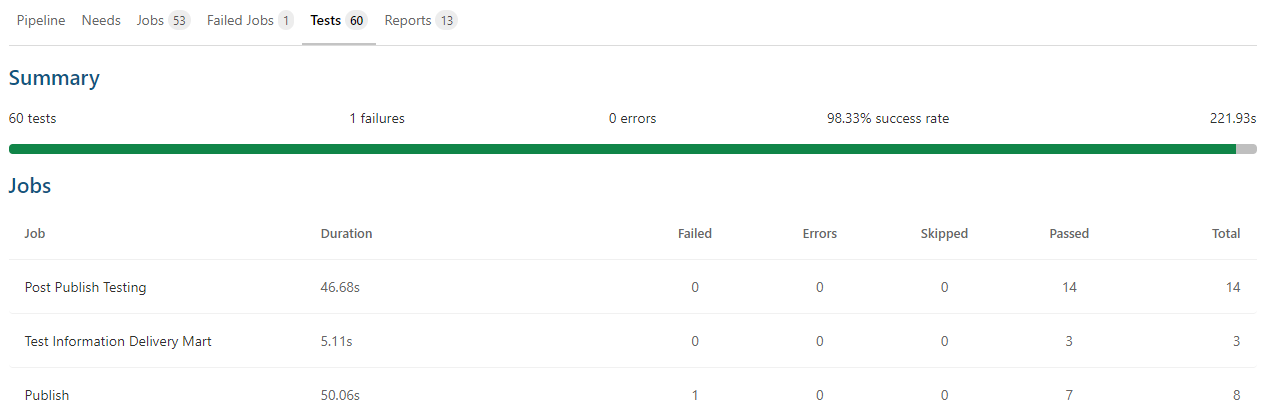
Once the job has run successfully, the job will add the test results to the pipeline's Tests tab.
2. Test states
It is possible to categorize the test result or state test in one of the following ways:
| State | Description | Example |
|---|---|---|
PASS |
The test executed and passed | The test is successful. The target fulfilled its specified condition, such as the correct number of rows present in a database table |
FAIL |
The test executed and failed | The test failed. The target did not meet its specified condition, such as the incorrect number of rows present in a table |
ERROR |
Error while executing a test | An error occurred while executing a test, such as an invalid column/table name specified in a table/dataset |
SKIPPED |
The test skipped due to an unfulfilled condition | The test did not execute because of an unfilled condition in a dataset/table |
3. Test report control
The following parameters control the generation of test reports:
| Parameter | Required/Optional | Description |
|---|---|---|
JSON_PATH |
Optional. Defaults to $TRANSFORM_PROJECT_PATH/target/run_results.json |
The path to the JSON result generated by the Transform orchestrator |
REPORT_NAME |
Optional. Defaults to report.xml |
The generated report name |
REPORT_DIR |
Optional. Defaults to $CI_PROJECT_DIR |
The path where the generated report is saved. Note: This directory must already exist before these tests run |
TREAT_TEST_ERRORS_AS_FAILED |
Optional. Defaults to FALSE |
If enabled, it reports a test error as FAIL. See Test state for more information |
TREAT_TEST_WARNS_AS_FAILED |
Optional. Defaults to FALSE | If enabled, it reports a test warning as FAIL. See Test state for more information |
Partial parse
For those unfamiliar, "parsing" means reading files in a project from disk and capturing ref()
and config() method calls. These method calls are used to determine the following:
- The shape of the dbt DAG (Direct Acyclic Graph)
- The supplied resource configurations
Every time you run a pipeline, dbt reads all files from scratch, even if nothing has changed. That wastes time — especially on large projects with 100s of models. That's where partial parsing steps in.
Partial parsing means:
- If files haven't changed, the system reuses the previously parsed information.
- Only new or changed files are re-parsed.
How does the orchestrator know if a file has changed? The Transform orchestrator compares information from the previous job request to identify modified files. If a file has changed between invocations, the orchestrator re-parses the file and updates the parsed node cache accordingly.
TRANSFORM_PARTIAL_PARSE is enabled by default. To disable this feature, set its value to 1.
To use partial parsing in a DataOps project, enable caching in the .modelling_and_transformation_base job. You can do this by overriding the settings from the [reference project’s base job]((https://app.dataops.live/reference-template-projects/dataops-template/dataops-reference/-/blob/5-stable/pipelines/includes/default/base_job_modelling_and_transformation.yml#L2) and creating a definition in your project as follows:
.modelling_and_transformation_base:
  image: $DATAOPS_TRANSFORM_RUNNER_IMAGE
  variables:
    DATAOPS_TEMPLATES_DIR: /tmp/local_config
    DATAOPS_SECONDARY_TEMPLATES_DIR: $CI_PROJECT_DIR/dataops/modelling
  cache:
    key: $CI_PIPELINE_ID
    paths:
      - dataops/modelling/target/
  icon: ${TRANSFORM_ICON}
Switching dbt version
Prerequisite (dbt 1.4 or later)
The DataOps MATE orchestrator uses dbt behind the scenes to run models. By default, MATE uses dbt version 1.12. If you want to use a different dbt version (say, another one like 1.11), you just set a variable called DATAOPS_FEATURE_MATE_DBT_VERSION.
This variable automatically supports the latest dbt minor release. The supported versions include bundled packages as well.
MATE supports the following dbt versions:
| Supported dbt Versions |
|---|
| 1.12 (Default) |
| 1.11 |
| 1.10 |
| 1.9 |
| 1.8 |
| 1.7 |
| 1.5 |
| 1.4 |
potential breaking changes
When upgrading a dbt version, potential breaking changes may affect specific existing setups:
- If moving from dbt 1.4 to 1.5, MATE jobs could fail if their configuration contains an empty
tests:keyword in your YAML file. You can resolve this by removing the emptytests:keyword.
Installing specific or unsupported dbt versions at runtime is also possible. Then you can set their values in the variable to use them with MATE. See the below topic for more details.
Using a specific or unsupported version
In the variable DATAOPS_FEATURE_MATE_DBT_VERSION, you can specify a dbt version currently not supported by DataOps,
such as 1.3, or a specific version of dbt-core, such as 1.4.3.
If you set an unsupported version, MATE will attempt to install the required dbt-core packages for the specified value.
Please use unsupported versions with care and be mindful of any potential risks.
Bundled Packages
Bundled packages such as dataops, dbtvault, etc., are unavailable if an unsupported version of dbt is specified.
In such case, you must set the required package in the file dataops/modelling/packages.yml and enable the variable
TRANSFORM_FORCE_DEPS. Read more about this package installation
at Installing additional packages.
Use the following formats to install new dbt versions:
| Value | Installed dbt-core Version |
Installed dbt-snowflake Version |
|---|---|---|
| 1.7 | Highest available version for 1.7 (>=1.7 and \<1.8) | 1.7.18 |
| 1.8 | Highest available version for 1.8 (>=1.8 and \<1.9) | 1.8.6 |
Installation of Pre-release version
Switching dbt version in MATE does not support installing pre-release versions of dbt.
Resolving macros collisions when changing dbt versions
When you decide to upgrade to a new dbt version, it is essential to be mindful of potential macro collisions that may arise. Different dbt versions often come with updates to bundled and custom-installed third-party packages. This may lead to conflicts in the macros used within your dbt project.
A macro collision occurs when discrepancies between macro definitions exist in different package versions.
For instance, consider a scenario where a macro named my_macro is currently being used in your dbt project.
In dbt version 1.0.9, the my_macro macro is defined within the my_package package version 0.8.0. However, if you upgrade to dbt version 1.4, the my_package package will be updated to version 1.0.0, which might result in changes to the my_macro macro.
These changes could include alterations to the macro's parameters or implementation. Additionally, it is possible that the my_macro has been renamed to my_macro_updated or is entirely missing, which could lead to job failures.
When you encounter macro conflicts while upgrading your dbt version, there are specific steps you can take to resolve them effectively. This topic addresses these conflicts to ensure a smooth transition and an uninterrupted operation.
Macro has changed between package versions:
Option 1: Update the model
- Examine the new macro's input requirements in the upgraded package version.
- Modify the model that uses the macro to align with the new macro's input requirements.
Option 2: Overwrite the macro
- If you prefer to retain the old macro version, overwrite the new version.
- Create a new file named
my_macro.sqlin the/dataops/modelling/macrosfolder of your dbt project. This action replaces any built-in macro with the same name, preserving your desired behavior.
Macro has a new name between package versions:
Option 1: Update the model call
- Identify the new name of the macro (e.g.,
my_macro_v2) from the upgraded package version. - Modify your model to call the macro with the new name, ensuring seamless integration.
Option 2: Create an alias
- Create an alias to continue using the old macro name.
- Create a new file named
my_macro.sqlin the/dataops/modelling/macrosfolder. - Inside the model files, include the macro call using the new macro name (
my_macro_v2). This alias approach will allow you to use the macro with its previous name while using the updated version.
Following these guidelines, you can effectively manage macro collisions when upgrading dbt versions. Understanding the potential issues and employing the appropriate solutions will help keep your dbt project running smoothly and prevent any disruptions caused by conflicting macros. Stay proactive and ensure a seamless transition when adapting to new dbt versions.
Defining a custom profiles.template.yml
You can customize the profiles.template.yml file in the /dataops/profiles directory for use by the MATE orchestrator. If you don’t define a profiles.template.yml in /dataops/profiles, the system will use the default version.
Note
The rendered file /dataops/profiles/profiles.yml will be removed after the /dataops script call to prevent exposing
credentials. You can set the parameter PREVENT_KEY_PAIR_CLEANUP to 1 to prevent the removal. Doing this helps avoid
cleaning up key-pair files (if in use).
Warning
The /dataops/profiles/profiles.yml contains all the details required to connect to your Snowflake account, including
sensitive information like credentials.
One can set up DATABASE_PROFILE and DATABASE_TARGET to execute macro with higher privilege.
See Running a macro using the SOLE Admin role
The default profiles.template.yml
The default profiles.template.yml is provided below. It defines the default DATABASE_PROFILE named
snowflake_operations and the default DATABASE_TARGET named other.
snowflake_operations:
  target: other
  outputs:
    other:
      type: snowflake
      account: {{ SNOWFLAKE.ACCOUNT }}
      user: {{ SNOWFLAKE.TRANSFORM.USERNAME }}
      role: {{ SNOWFLAKE.TRANSFORM.ROLE }}
      {% if env.DATAOPS_SNOWFLAKE_AUTH %}
        {% if env.DATAOPS_SNOWFLAKE_AUTH == "KEY_PAIR" %}
      private_key_path: {{ env.DATAOPS_SNOWFLAKE_KEY_PAIR_PATH }}
          {% if env.DATAOPS_SNOWFLAKE_PASSPHRASE %}
      private_key_passphrase: {{ env.DATAOPS_SNOWFLAKE_PASSPHRASE }}
          {% endif %}
        {% else %}
      password: {{ SNOWFLAKE.TRANSFORM.PASSWORD }}
        {% endif %}
      {% else %}
      password: {{ SNOWFLAKE.TRANSFORM.PASSWORD }}
      {% endif %}
      database: {{ env.DATABASE }}
      schema: BASESCHEMA
      warehouse: {{ SNOWFLAKE.TRANSFORM.WAREHOUSE }}
      threads: {{ SNOWFLAKE.TRANSFORM.THREADS }}
      client_session_keep_alive: False
    qa:
      type: snowflake
      account: {{ SNOWFLAKE.ACCOUNT }}
      user: {{ SNOWFLAKE.TRANSFORM.USERNAME }}
      role: {{ SNOWFLAKE.TRANSFORM.ROLE }}
      {% if env.DATAOPS_SNOWFLAKE_AUTH %}
        {% if env.DATAOPS_SNOWFLAKE_AUTH == "KEY_PAIR" %}
      private_key_path: {{ env.DATAOPS_SNOWFLAKE_KEY_PAIR_PATH }}
          {% if env.DATAOPS_SNOWFLAKE_PASSPHRASE %}
      private_key_passphrase: {{ env.DATAOPS_SNOWFLAKE_PASSPHRASE }}
          {% endif %}
        {% else %}
      password: {{ SNOWFLAKE.TRANSFORM.PASSWORD }}
        {% endif %}
      {% else %}
      password: {{ SNOWFLAKE.TRANSFORM.PASSWORD }}
      {% endif %}
      database: {{ env.DATABASE }}
      schema: BASESCHEMA
      warehouse: {{ SNOWFLAKE.TRANSFORM.WAREHOUSE }}
      threads: {{ SNOWFLAKE.TRANSFORM.THREADS }}
      client_session_keep_alive: False
    prod:
      type: snowflake
      account: {{ SNOWFLAKE.ACCOUNT }}
      user: {{ SNOWFLAKE.TRANSFORM.USERNAME }}
      role: {{ SNOWFLAKE.TRANSFORM.ROLE }}
      {% if env.DATAOPS_SNOWFLAKE_AUTH %}
        {% if env.DATAOPS_SNOWFLAKE_AUTH == "KEY_PAIR" %}
      private_key_path: {{ env.DATAOPS_SNOWFLAKE_KEY_PAIR_PATH }}
          {% if env.DATAOPS_SNOWFLAKE_PASSPHRASE %}
      private_key_passphrase: {{ env.DATAOPS_SNOWFLAKE_PASSPHRASE }}
          {% endif %}
        {% else %}
      password: {{ SNOWFLAKE.TRANSFORM.PASSWORD }}
        {% endif %}
      {% else %}
      password: {{ SNOWFLAKE.TRANSFORM.PASSWORD }}
      {% endif %}
      database: {{ env.DATABASE }}
      schema: BASESCHEMA
      warehouse: {{ SNOWFLAKE.TRANSFORM.WAREHOUSE }}
      threads: {{ SNOWFLAKE.TRANSFORM.THREADS }}
      client_session_keep_alive: False

snowflake_ingestion:
  outputs:
    default:
      type: snowflake
      account: {{ SNOWFLAKE.ACCOUNT }}
      user: {{ SNOWFLAKE.INGESTION.USERNAME }}
      role: {{ SNOWFLAKE.INGESTION.ROLE }}
      {% if env.DATAOPS_SNOWFLAKE_AUTH %}
        {% if env.DATAOPS_SNOWFLAKE_AUTH == "KEY_PAIR" %}
      private_key_path: {{ env.DATAOPS_SNOWFLAKE_KEY_PAIR_PATH }}
          {% if env.DATAOPS_SNOWFLAKE_PASSPHRASE %}
      private_key_passphrase: {{ env.DATAOPS_SNOWFLAKE_PASSPHRASE }}
          {% endif %}
        {% else %}
      password: {{ SNOWFLAKE.INGESTION.PASSWORD }}
        {% endif %}
      {% else %}
      password: {{ SNOWFLAKE.INGESTION.PASSWORD }}
      {% endif %}
      database: {{ DATABASE }}
      schema: BASESCHEMA
      warehouse: {{ SNOWFLAKE.INGESTION.WAREHOUSE }}
      threads: {{ SNOWFLAKE.INGESTION.THREADS }}
      client_session_keep_alive: False

snowflake_master:
  outputs:
    default:
      type: snowflake
      account: {{ SNOWFLAKE.ACCOUNT }}
      user: {{ SNOWFLAKE.MASTER.USERNAME }}
      role: {{ SNOWFLAKE.MASTER.ROLE }}
      {% if env.DATAOPS_SNOWFLAKE_AUTH %}
        {% if env.DATAOPS_SNOWFLAKE_AUTH == "KEY_PAIR" %}
      private_key_path: {{ env.DATAOPS_SNOWFLAKE_KEY_PAIR_PATH }}
          {% if env.DATAOPS_SNOWFLAKE_PASSPHRASE %}
      private_key_passphrase: {{ env.DATAOPS_SNOWFLAKE_PASSPHRASE }}
          {% endif %}
        {% else %}
      password: {{ SNOWFLAKE.MASTER.PASSWORD }}
        {% endif %}
      {% else %}
      password: {{ SNOWFLAKE.MASTER.PASSWORD }}
      {% endif %}
      database: {{ env.DATABASE }}
      schema: BASESCHEMA
      warehouse: {{ SNOWFLAKE.TRANSFORM.WAREHOUSE }}
      threads: {{ SNOWFLAKE.TRANSFORM.THREADS }}
      client_session_keep_alive: False

config:
  send_anonymous_usage_stats: False
Migrating to the /dataops/profiles directory
If you have customized the profiles.template.yml file in the DataOps Runner host directory /app, copy its contents to the new project’s Git directory /dataops/profiles. To enable key-pair authentication, start with the default profiles.template.yml and merge your changes. In most cases, the default file will suffice.
If no profiles.template.yml file exists in the /dataops/profiles directory, the system will use the default version.
Authentication
Key-pair authentication
MATE orchestrator supports using key-pair authentication. To learn how to configure it, see key-pair authentication.
Example jobs
The examples below extend the base job .modelling_and_transformation_base to simplify the MATE job definition. See
the reference project base job for all details about these examples.
For ease of reading, the examples below are summarized as follows:
- Build all models
- Rebuild incremental models
- Build a directory of models
- Build tagged models
- Test all models
- Build models by running a macro
- Build models with multiple arguments
- Run a macro using the SOLE Admin role
- Build selected models
- Test indirect selection models
- Add/Override variables to dbt at runtime
1. Build all models
Build all the models in your project:
"Build all Models":
  extends:
    - .modelling_and_transformation_base
    - .agent_tag
  stage: "Data Transformation"
  image: $DATAOPS_TRANSFORM_RUNNER_IMAGE
  variables:
    TRANSFORM_ACTION: RUN
  script:
    - /dataops
  icon: ${TRANSFORM_ICON}
2. Rebuild incremental models
Force dbt to rebuild the incremental model from scratch. dbt will drop the existing target table in the database before rebuilding it:
"MATE full refresh":
  extends:
    - .modelling_and_transformation_base
    - .agent_tag
  variables:
    TRANSFORM_ACTION: RUN
    FULL_REFRESH: 1
  stage: "Source Transformation"
  script:
    - /dataops
  icon: ${TRANSFORM_ICON}
  artifacts:
    when: always
    reports:
      junit: $CI_PROJECT_DIR/report.xml
3. Build a directory of models
Build all the models in the divisions/finance directory:
"Build all Models":
  extends:
    - .modelling_and_transformation_base
    - .agent_tag
  stage: "Data Transformation"
  image: $DATAOPS_TRANSFORM_RUNNER_IMAGE
  variables:
    TRANSFORM_ACTION: RUN
    TRANSFORM_MODEL_SELECTOR: models/divisions/finance
  script:
    - /dataops
  icon: ${TRANSFORM_ICON}
4. Build tagged models
Build all the models tagged finance:
"Build all Models":
  extends:
    - .modelling_and_transformation_base
    - .agent_tag
  stage: "Data Transformation"
  image: $DATAOPS_TRANSFORM_RUNNER_IMAGE
  variables:
    TRANSFORM_ACTION: RUN
    TRANSFORM_MODEL_SELECTOR: tag:finance
  script:
    - /dataops
  icon: ${TRANSFORM_ICON}
5. Test all models
The TRANSFORM_MODEL_SELECTOR variable works the same way with TEST as it does with RUN.
"Test all Models":
  extends:
    - .modelling_and_transformation_base
    - .agent_tag
  stage: "Transformation Testing"
  image: $DATAOPS_TRANSFORM_RUNNER_IMAGE
  variables:
    TRANSFORM_ACTION: TEST
  script:
    - /dataops
  artifacts:
    when: always
    reports:
      junit: $CI_PROJECT_DIR/report.xml
  icon: ${TESTING_ICON}
6. Build models by running a macro
Rather than building/testing all or part of the MATE models, a MATE job can also execute a standalone macro as its primary operation.
Run My Macro:
  extends:
    - .modelling_and_transformation_base
    - .agent_tag
  stage: "Additional Configuration"
  image: $DATAOPS_TRANSFORM_RUNNER_IMAGE
  variables:
    TRANSFORM_ACTION: OPERATION
    TRANSFORM_OPERATION_NAME: my_macro
  script:
    - /dataops
  icon: ${TRANSFORM_ICON}
7. Build models with multiple arguments
Rather than building MATE models with a single argument, you can list multiple arguments in a single line with spaces. See the below example for more information.
Build all Models:
  extends:
    - .modelling_and_transformation_base
    - .agent_tag
  variables:
    TRANSFORM_ACTION: RUN
    TRANSFORM_EXTRA_PARAMS_BEFORE: --log-format json --fail-fast --warn-error
  stage: "Data Transformation"
  script:
    - /dataops
  icon: ${TRANSFORM_ICON}
Here is what the multiple arguments will do if added to the variable TRANSFORM_EXTRA_PARAMS_BEFORE:
--log-format jsonprints the output in a JSON format--fail-fastfails the dbt run as soon as any model fails, rather than running all of the models--warn-errorconvert all the warnings to errors
8. Run a macro using the SOLE Admin role
Setting DATABASE_PROFILE and DATABASE_TARGET to the values snowflake_master and default, respectively (as per
the example below) will execute the macro using the higher privileges that SOLE uses.
"Run My Macro as Admin":
  extends:
    - .modelling_and_transformation_base
    - .agent_tag
  stage: "Additional Configuration"
  image: $DATAOPS_TRANSFORM_RUNNER_IMAGE
  variables:
    TRANSFORM_ACTION: OPERATION
    TRANSFORM_OPERATION_NAME: my_macro
    DATABASE_PROFILE: snowflake_master
    DATABASE_TARGET: default
  script:
    - /dataops
  icon: ${TRANSFORM_ICON}
9. Build selected models
Prerequisite (dbt 1.4 or later)
Build models according to what you set in the resource selector in YAML, which allows you to write resource selector configurations in a human-readable and reusable format:
selectors:
  - name: business_vault_tests
    description: "Non-incremental Snowplow models that power nightly exports"
    definition:
      union:
        - method: tag
          value: datavault_business_vault
        - exclude:
            - union:
                - method: tag
                  value: datavault_raw
                - method: tag
                  value: datavault_stage
Set the name of the selector in TRANSFORM_YAML_SELECTOR:
Run My Macro:
  extends:
    - .modelling_and_transformation_base
    - .agent_tag
  stage: "Additional Configuration"
  image: $DATAOPS_TRANSFORM_RUNNER_IMAGE
  variables:
    TRANSFORM_ACTION: RUN
    TRANSFORM_YAML_SELECTOR: business_vault_tests
  script:
    - /dataops
  icon: ${TRANSFORM_ICON}
10. Exclude tests selected indirectly
You can select tests directly by methods and operators that capture one of the tests' attributes, names, properties, tags, etc. But dbt also indirectly selects all tests that touch any resource you select. See the below example for more information.
"Test Direct Selection Model":
  extends:
    - .modelling_and_transformation_base
    - .agent_tag
  stage: "Transformation Testing"
  image: $DATAOPS_TRANSFORM_RUNNER_IMAGE
  variables:
    TRANSFORM_ACTION: TEST
    TRANSFORM_MODEL_SELECTOR: tag:direct
    TRANSFORM_MODEL_INDIRECT_SELECTION_MODE: cautious
  script:
    - /dataops
  artifacts:
    when: always
    reports:
      junit: $CI_PROJECT_DIR/report.xml
  icon: ${TESTING_ICON}
Test against a direct tagged parent model:
version: 2
models:
  - name: direct_selection_model
    description: "dbt model"
    columns:
      - name: id
        description: "The primary key for this table"
        tests:
          - unique
Test against an indirect tagged child model (referenced from the direct tagged model):
While testing a direct tagged model, setting the value of the TRANSFORM_MODEL_INDIRECT_SELECTION_MODE variable to "
cautious" in the pipeline will not include the below test for the child model.
version: 2
models:
  - name: indirect_selection_model
    tests:
      - dataops.same_rows_as:
          compare_model: ref('direct_selection_model')
    description: >
      Some exciting stuff
For more details about indirect selection, see test selection examples.
11. Add/Override variables to dbt at runtime
Prerequisite (dbt 1.4 or later)
You can specify variables with a dynamic runtime value using the parameters TRANSFORM_VARS. If set, the value is
added to dbt command-line arguments as --vars.
Run My Macro:
  extends:
    - .modelling_and_transformation_base
    - .agent_tag
  stage: "Additional Configuration"
  image: $DATAOPS_TRANSFORM_RUNNER_IMAGE
  variables:
    TRANSFORM_ACTION: RUN
    TRANSFORM_VARS: "{ var_one: Value one, var_two: 2 }"
  script:
    - /dataops
  icon: ${TRANSFORM_ICON}
Run My Macro:
  extends:
    - .modelling_and_transformation_base
    - .agent_tag
  stage: "Additional Configuration"
  image: $DATAOPS_TRANSFORM_RUNNER_IMAGE
  variables:
    TRANSFORM_ACTION: RUN
    TRANSFORM_VARS: >-
      { var_one: Value one, var_two: 2 }
  script:
    - /dataops
  icon: ${TRANSFORM_ICON}