Reporting Orchestrator
Enterprise
| Image | $DATAOPS_REPORTING_RUNNER_IMAGE |
|---|
The Reporting orchestrator is designed with a few prebuilt queries to generate reports that detail what happens during a pipeline run. And to provide flexibility, you can also use custom queries to generate such reports according to your needs and attach them to the pipeline.
Typical use cases are to:
- report on pipeline execution
- summarize pipeline metadata
- aggregate query performance metrics
- generate audit reports
The orchestrator provides two capabilities building on each other:
- A run phase to generate the report data as CSV or JSON by executing Snowflake queries or shell scripts
- A render phase to provide the report data as a static web application accessible from the pipeline reports tab
These two phases run sequentially as part of the same job.
Note
A single DataOps pipeline can generate multiple reports, but you must configure one Reporting orchestrator job for each report in the pipeline.
Usage
The orchestrator runs a SQL query or a shell script that generates an output and renders it as a report in the form of a static web application.
The following diagram shows the workflow in more detail using the csv_html web application:
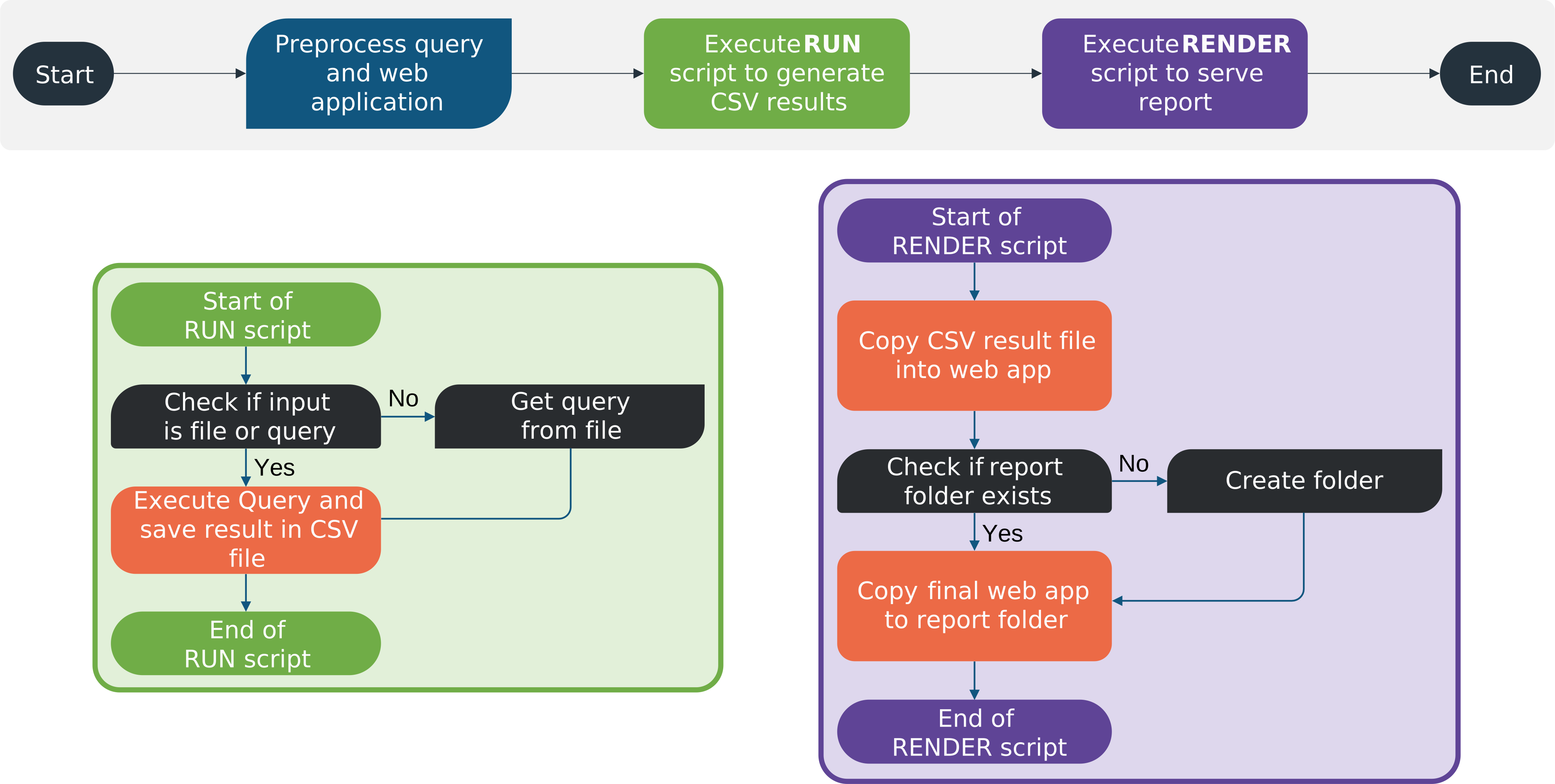
- In the preprocessing phase, template rendering is applied to the run phase queries and the render phase web application HTML, e.g. to inject pipeline or job variables.
- In the run phase, the specified SQL query is executed generating the report data as CSV and storing it as file
${CI_JOB_ID}_output.out. - In the render phase, the output file is copied into the csv_html web application and is published as a pipeline report.
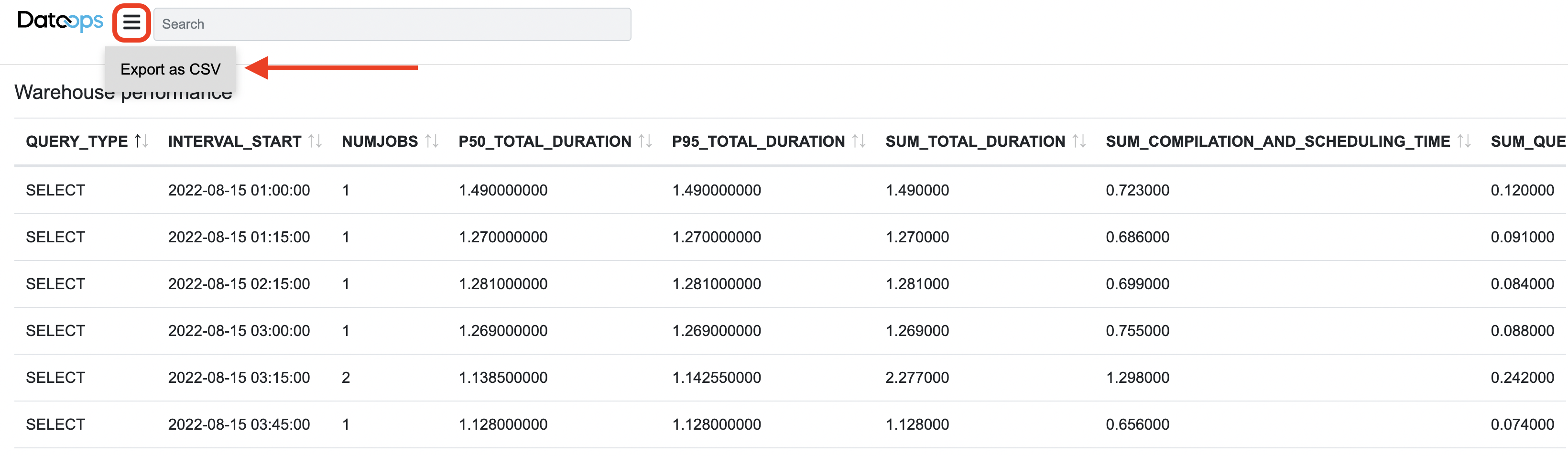
Once the pipeline is completed, you can browse the report and export it as CSV if needed:
Here is what a typical reporting job looks like:
"My Reporting Job":
  extends:
    - .agent_tag
  stage: "Generate Report"
  image: $DATAOPS_REPORTING_RUNNER_IMAGE
  variables:
    DATAOPS_REPORTER_ACTION: START

    ## template rendering parameters
    DATAOPS_TEMPLATES_DIR: "$CI_PROJECT_DIR/dataops/generic_reporter"
    # web app templates
    DATAOPS_SECONDARY_TEMPLATES_DIR: /render-utils/csv_html, /render-utils/role_explorer_html

    ## Run phase parameters
    DATAOPS_REPORTER_RUN_SCRIPT: /snowflake-utils/execute_query
    DATAOPS_REPORTER_SNOWFLAKE_RUN_QUERY: $CI_PROJECT_DIR/dataops/generic_reporter/get_row_count.sql

    ## Render phase parameters
    DATAOPS_REPORTER_RENDER_SCRIPT: /render-utils/csv_to_html

    ## Credentials
    DATAOPS_REPORTER_RUN_SNOWFLAKE_ACCOUNT: DATAOPS_VAULT(SNOWFLAKE.ACCOUNT)
    DATAOPS_REPORTER_RUN_SNOWFLAKE_USERNAME: DATAOPS_VAULT(SNOWFLAKE.INGESTION.USERNAME)
    DATAOPS_REPORTER_RUN_SNOWFLAKE_PASSWORD: DATAOPS_VAULT(SNOWFLAKE.INGESTION.PASSWORD)
    DATAOPS_REPORTER_RUN_SNOWFLAKE_WAREHOUSE: DATAOPS_VAULT(SNOWFLAKE.INGESTION.WAREHOUSE)
    DATAOPS_REPORTER_RUN_SNOWFLAKE_ROLE: DATAOPS_VAULT(SNOWFLAKE.INGESTION.ROLE)

  script:
    - /dataops

  ## Report properties
  artifacts:
    name: "Get row count"
    when: always
    paths:
      - $CI_PROJECT_DIR/dataops/reports
    expose_as: "DataOpsReport"
  icon: ${REPORT_ICON}
Supported parameters
The parameters for the preprocessing, run, and render phases are the following:
| Parameter | Required/Default | Description |
|---|---|---|
DATAOPS_REPORTER_ACTION |
REQUIRED | The orchestrator starts the script to send the generated report to the desired location when set to START |
DATAOPS_TEMPLATES_DIR |
REQUIRED | The directory where you place your query templates. The recommended setting is $CI_PROJECT_DIR/dataops/generic_reporter |
DATAOPS_SECONDARY_TEMPLATES_DIR |
REQUIRED | The directory where you place your templated static web application. The recommended setting is /render-utils/csv_html. It accepts multiple directory paths as a comma-delimited list, e.g. /render-utils/csv_html, /render-utils/role_explorer_html, ${CI_PROJECT_DIR}/my_app_html. These directories are processed recursively. |
DATAOPS_REPORTER_RUN_SCRIPT |
REQUIRED | A shell script that creates the result file, e.g. /snowflake-utils/execute_query. |
DATAOPS_REPORTER_RENDER_SCRIPT |
REQUIRED | The path to the render script used to generate the report from the result file, i.e. /render-utils/csv_to_html, /render-utils/role_explorer, or your custom one |
DATAOPS_REPORTER_RENDER_ENV |
Optional | The execution environment for DATAOPS_REPORTER_RENDER_SCRIPT which can be python, python3, r, node, perl, or bash. If left empty, the environment is derived from the script's shebang. |
DATAOPS_REPORTER_RUN_ENV |
Optional | The execution environment for DATAOPS_REPORTER_RUN_SCRIPT which can be python, python3, r, node, perl, or bash. If left empty, the environment is derived from the script's shebang. |
execute_query Parameters
A typical scenario is to execute Snowflake SQL during the run phase and issue a query. But if you want to update Snowflake during the render phase, use the script /snowflake-utils/execute_query either as DATAOPS_REPORTER_RUN_SCRIPT or DATAOPS_REPORTER_RENDER_SCRIPT.
When used as a run-phase script, it supports the following parameters:
| Parameter | Required/Default | Description |
|---|---|---|
DATAOPS_REPORTER_SNOWFLAKE_RUN_QUERY |
REQUIRED | Either a direct query like "select distinct(*) from $DATABASE.META.TABLE1" or a path to a file with a SQL query |
DATAOPS_REPORTER_SNOWFLAKE_RUN_FORMAT |
Optional | Either csv (default) or json |
DATAOPS_REPORTER_RUN_SNOWFLAKE_ACCOUNT |
REQUIRED | Recommended to set it to DATAOPS_VAULT(SNOWFLAKE.ACCOUNT) |
DATAOPS_REPORTER_RUN_SNOWFLAKE_USERNAME |
REQUIRED | Recommended to set it to DATAOPS_VAULT(SNOWFLAKE.INGESTION.USERNAME) |
DATAOPS_REPORTER_RUN_SNOWFLAKE_PASSWORD |
REQUIRED | Recommended to set it to DATAOPS_VAULT(SNOWFLAKE.INGESTION.PASSWORD) |
DATAOPS_REPORTER_RUN_SNOWFLAKE_WAREHOUSE |
REQUIRED | Recommended to set it to DATAOPS_VAULT(SNOWFLAKE.INGESTION.WAREHOUSE) |
DATAOPS_REPORTER_RUN_SNOWFLAKE_ROLE |
REQUIRED | Recommended to set it to DATAOPS_VAULT(SNOWFLAKE.INGESTION.ROLE) |
When used as a render-phase script, it supports the following parameters:
| Parameter | Required/Default | Description |
|---|---|---|
DATAOPS_REPORTER_SNOWFLAKE_RENDER_QUERY |
REQUIRED | Either a direct query like "select distinct(*) from $DATABASE.META.TABLE1" or a path to a file with a SQL query |
DATAOPS_REPORTER_SNOWFLAKE_RENDER_FORMAT |
Optional | One of csv (default) or json |
DATAOPS_REPORTER_RENDER_SNOWFLAKE_ACCOUNT |
REQUIRED | Recommended to set it to DATAOPS_VAULT(SNOWFLAKE.ACCOUNT) |
DATAOPS_REPORTER_RENDER_SNOWFLAKE_USERNAME |
REQUIRED | Recommended to set it to DATAOPS_VAULT(SNOWFLAKE.INGESTION.USERNAME) |
DATAOPS_REPORTER_RENDER_SNOWFLAKE_PASSWORD |
REQUIRED | Recommended to set it to DATAOPS_VAULT(SNOWFLAKE.INGESTION.PASSWORD) |
DATAOPS_REPORTER_RENDER_SNOWFLAKE_WAREHOUSE |
REQUIRED | Recommended to set it to DATAOPS_VAULT(SNOWFLAKE.INGESTION.WAREHOUSE) |
DATAOPS_REPORTER_RENDER_SNOWFLAKE_ROLE |
REQUIRED | Recommended to set it to DATAOPS_VAULT(SNOWFLAKE.INGESTION.ROLE) |
The Reporting orchestrator also supports using Snowflake key-pair authentication. See the key-pair authentication documentation for the additional parameters.
Info
The Reporting orchestrator currently only supports a single key pair for the run and render queries.
Key-pair authentication
Reporting Orchestrator supports connecting to Snowflake using key-pair authentication. For configuration details,
see the key-pair authentication documentation. To use this authentication
method with the orchestrator, set the relevant parameters inside the variables section of your reporting job. For
example:
"Render Row Count Report":
  extends:
    - .agent_tag
  stage: "Generate Report"
  image: $DATAOPS_REPORTING_RUNNER_IMAGE
  variables:
    ...
    DATAOPS_REPORTER_RUN_SNOWFLAKE_ACCOUNT: DATAOPS_VAULT(SNOWFLAKE.ACCOUNT)
    DATAOPS_REPORTER_RUN_SNOWFLAKE_USERNAME: DATAOPS_VAULT(SNOWFLAKE.SOLE.USERNAME)
    DATAOPS_SNOWFLAKE_AUTH: KEY_PAIR
    DATAOPS_SNOWFLAKE_KEY_PAIR: DATAOPS_VAULT(SNOWFLAKE.SOLE.KEY_PAIR)
    DATAOPS_SNOWFLAKE_PASSPHRASE: DATAOPS_VAULT(SNOWFLAKE.SOLE.PASSPHRASE)
    ...
  script:
    - /dataops
  artifacts:
    name: "Tables row count"
    when: always
    paths:
      - $CI_PROJECT_DIR/dataops/reports
    expose_as: DataOpsReport
  icon: ${REPORT_ICON}
Example jobs
Here are a few examples that show how to use this orchestrator and the parameters you need to set up:
Row count of all tables
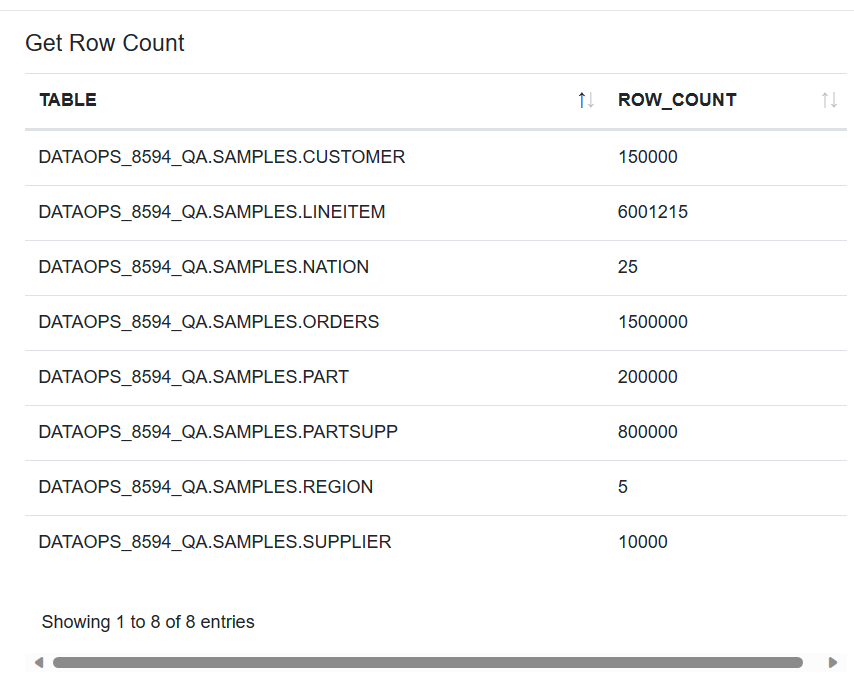
This example shows how the Reporting orchestrator runs a SQL query, generates a CSV output file, and makes it available in the reports area of your pipeline. The file reports the total number of table rows in your Snowflake database during the pipeline run.
Note that the query:
- Uses the environment variable
env.DATAOPS_DATABASEto query the current database. - Requires template rendering to replace the variable with a value, thus, you must use the file extension
.template.sqlinstead.sql.
SELECT table_catalog
       || '.'
       || table_schema
       || '.'
       || table_name AS "TABLE",
       row_count
FROM   "{{ env.DATAOPS_DATABASE }}".information_schema.tables
WHERE  table_type = 'BASE TABLE';
This SQL script is called by the Reporting orchestrator job, as described in the following YAML config file:
"Get Row Count":
  extends:
    - .agent_tag
  stage: "Generate Report"
  image: $DATAOPS_REPORTING_RUNNER_IMAGE
  variables:
    DATAOPS_REPORTER_ACTION: START

    ## template rendering parameters
    DATAOPS_TEMPLATES_DIR: "$CI_PROJECT_DIR/dataops/generic_reporter"
    # CSV web app template
    DATAOPS_SECONDARY_TEMPLATES_DIR: /render-utils/csv_html

    ## Run phase parameters
    # Executing the query from `DATAOPS_REPORTER_SNOWFLAKE_RUN_QUERY`
    DATAOPS_REPORTER_RUN_SCRIPT: /snowflake-utils/execute_query
    # Path to SQL query
    DATAOPS_REPORTER_SNOWFLAKE_RUN_QUERY: $CI_PROJECT_DIR/dataops/generic_reporter/get_row_count.sql

    ## Render phase parameters
    # Merge CSV with web app template
    DATAOPS_REPORTER_RENDER_SCRIPT: /render-utils/csv_to_html

    ## Credentials
    DATAOPS_REPORTER_RUN_SNOWFLAKE_ACCOUNT: DATAOPS_VAULT(SNOWFLAKE.ACCOUNT)
    DATAOPS_REPORTER_RUN_SNOWFLAKE_USERNAME: DATAOPS_VAULT(SNOWFLAKE.INGESTION.USERNAME)
    DATAOPS_REPORTER_RUN_SNOWFLAKE_PASSWORD: DATAOPS_VAULT(SNOWFLAKE.INGESTION.PASSWORD)
    DATAOPS_REPORTER_RUN_SNOWFLAKE_WAREHOUSE: DATAOPS_VAULT(SNOWFLAKE.INGESTION.WAREHOUSE)
    DATAOPS_REPORTER_RUN_SNOWFLAKE_ROLE: DATAOPS_VAULT(SNOWFLAKE.INGESTION.ROLE)
  script:
    - /dataops
  icon: ${REPORT_ICON}

  ## Report properties
  artifacts:
    name: "Get row count"
    when: always
    paths:
      - $CI_PROJECT_DIR/dataops/reports
    expose_as: "DataOpsReport"
  icon: ${REPORT_ICON}
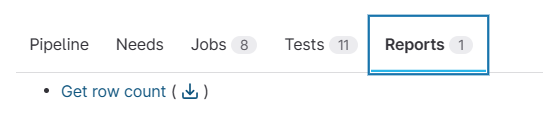
After running the job, you find and open the report here:

The file generated looks like the following:
Clicking the report opens the details of row counts in the tables:
Note
If you download the report, you will get a .zip with .html files which may need a web server to be displayed. We recommend browsing the files from within the pipeline reports section.
Role explorer
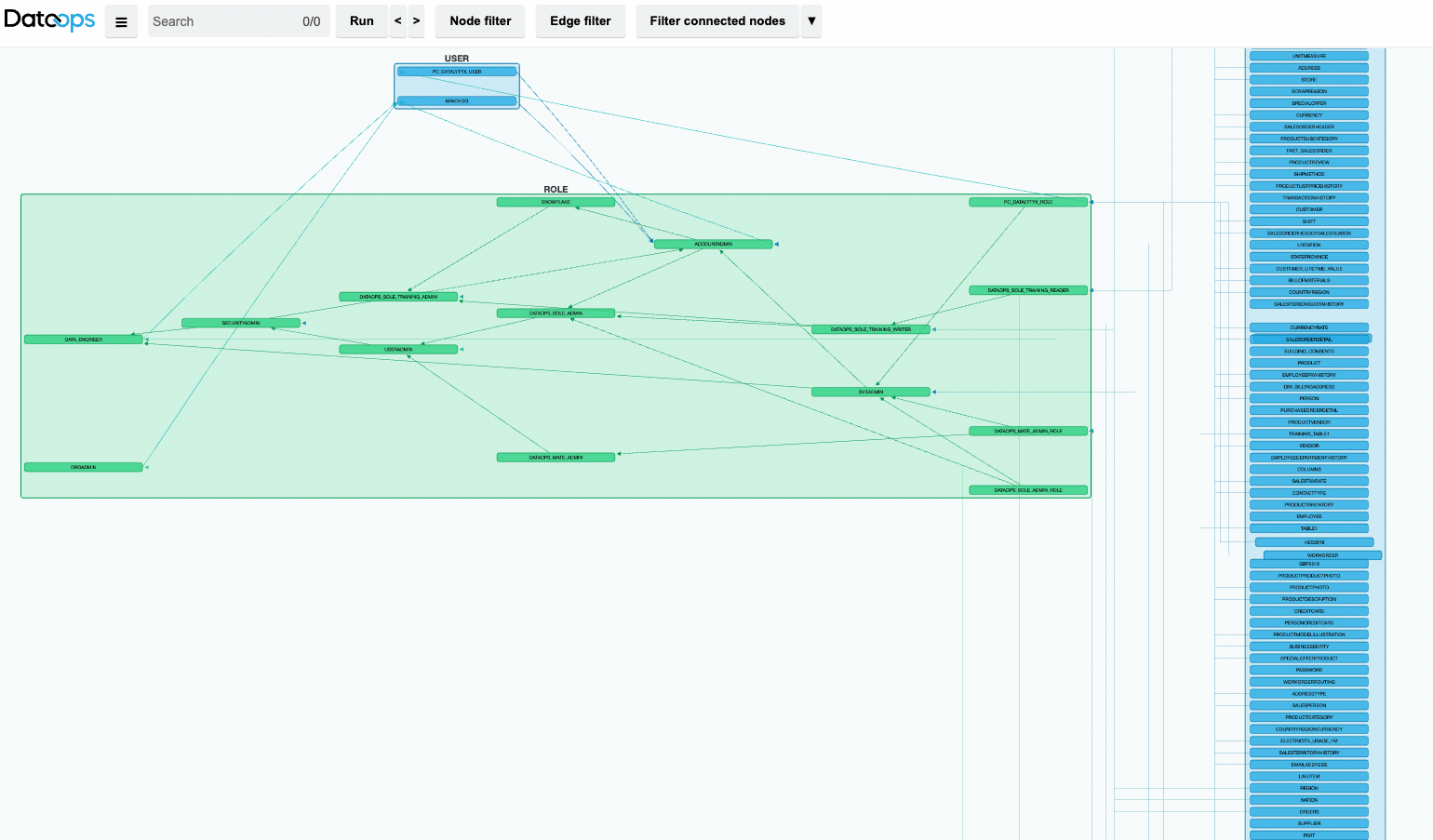
This example shows how you can create an interactive report of all Snowflake roles and their associated Snowflake objects.
Here is the job:
"Live Role Explorer":
  extends:
    - .agent_tag
  stage: "Generate Report"
  image: $DATAOPS_REPORTING_RUNNER_IMAGE
  variables:
    DATAOPS_REPORTER_ACTION: START

    ## template rendering parameters
    DATAOPS_TEMPLATES_DIR: "$CI_PROJECT_DIR/dataops/generic_reporter"
    DATAOPS_SECONDARY_TEMPLATES_DIR: /render-utils/role_explorer_html

    ## Run phase parameters
    # Executing the query from `DATAOPS_REPORTER_SNOWFLAKE_RUN_QUERY`
    DATAOPS_REPORTER_RUN_SCRIPT: /snowflake-utils/execute_query
    # Path to SQL query
    DATAOPS_REPORTER_SNOWFLAKE_RUN_QUERY: /snowflake-queries/role_reporter.sql
    # Role Explorer uses JSON
    DATAOPS_REPORTER_SNOWFLAKE_RUN_FORMAT: json

    ## Render phase parameters
    # Render the JSON as HTML
    DATAOPS_REPORTER_RENDER_SCRIPT: /render-utils/role_explorer

    ## Credentials
    DATAOPS_REPORTER_RUN_SNOWFLAKE_ACCOUNT: DATAOPS_VAULT(SNOWFLAKE.ACCOUNT)
    DATAOPS_REPORTER_RUN_SNOWFLAKE_USERNAME: DATAOPS_VAULT(SNOWFLAKE.MASTER.USERNAME)
    DATAOPS_REPORTER_RUN_SNOWFLAKE_PASSWORD: DATAOPS_VAULT(SNOWFLAKE.MASTER.PASSWORD)
    DATAOPS_REPORTER_RUN_SNOWFLAKE_WAREHOUSE: DATAOPS_VAULT(SNOWFLAKE.INGESTION.WAREHOUSE)
    DATAOPS_REPORTER_RUN_SNOWFLAKE_ROLE: DATAOPS_VAULT(SNOWFLAKE.MASTER.ROLE)
  script:
    - /dataops
  icon: ${REPORT_ICON}

  ## Report properties
  artifacts:
    paths:
      - $CI_PROJECT_DIR/dataops/reports
    name: "DataOps Role Explorer Live"
    expose_as: "DataOpsReport"
  icon: ${REPORT_ICON}
Here is what the output looks like:
Note
Make sure the DATAOPS_REPORTER_RUN_SNOWFLAKE_ROLE used has sufficient privileges to query role privileges.
All pipeline queries
This example shows how you can create a report of all queries during a pipeline run. When other DataOps orchestrators issue queries, they tag each of the queries with the current pipeline ID. The report can then pull all queries that included a specific tag value using CI_PIPELINE_ID.
SELECT *
FROM   "SNOWFLAKE"."ACCOUNT_USAGE"."QUERY_HISTORY"
WHERE  query_tag LIKE '%"DataOps_Pipeline_ID": "{{ env.CI_PIPELINE_ID }}"%'
Remember to add a .template before the .sql file extension so that the pipeline ID gets replaced by template rendering with the actual value.
"Current Pipeline Queries":
  extends:
    - .agent_tag
  stage: "Generate Report"
  image: $DATAOPS_REPORTING_RUNNER_IMAGE
  variables:
    DATAOPS_REPORTER_ACTION: START

    ## template rendering parameters
    DATAOPS_TEMPLATES_DIR: "$CI_PROJECT_DIR/dataops/generic_reporter"
    # CSV web app template
    DATAOPS_SECONDARY_TEMPLATES_DIR: /render-utils/csv_html

    ## Run phase parameters
    # Executing the query from `DATAOPS_REPORTER_SNOWFLAKE_RUN_QUERY`
    DATAOPS_REPORTER_RUN_SCRIPT: /snowflake-utils/execute_query
    # Path to SQL query
    DATAOPS_REPORTER_SNOWFLAKE_RUN_QUERY: $CI_PROJECT_DIR/dataops/generic_reporter/get_pipeline_jobs.sql

    ## Render phase parameters
    # Merge CSV with web app template
    DATAOPS_REPORTER_RENDER_SCRIPT: /render-utils/csv_to_html

    ## Credentials
    DATAOPS_REPORTER_RUN_SNOWFLAKE_ACCOUNT: DATAOPS_VAULT(SNOWFLAKE.ACCOUNT)
    DATAOPS_REPORTER_RUN_SNOWFLAKE_USERNAME: DATAOPS_VAULT(SNOWFLAKE.INGESTION.USERNAME)
    DATAOPS_REPORTER_RUN_SNOWFLAKE_PASSWORD: DATAOPS_VAULT(SNOWFLAKE.INGESTION.PASSWORD)
    DATAOPS_REPORTER_RUN_SNOWFLAKE_WAREHOUSE: DATAOPS_VAULT(SNOWFLAKE.INGESTION.WAREHOUSE)
    DATAOPS_REPORTER_RUN_SNOWFLAKE_ROLE: DATAOPS_VAULT(SNOWFLAKE.INGESTION.ROLE)
  script:
    - /dataops
  icon: ${REPORT_ICON}

  ## Report properties
  artifacts:
    name: "Current Pipeline Snowflake Queries"
    when: always
    paths:
      - $CI_PROJECT_DIR/dataops/reports
    expose_as: "DataOpsReport"
  icon: ${REPORT_ICON}
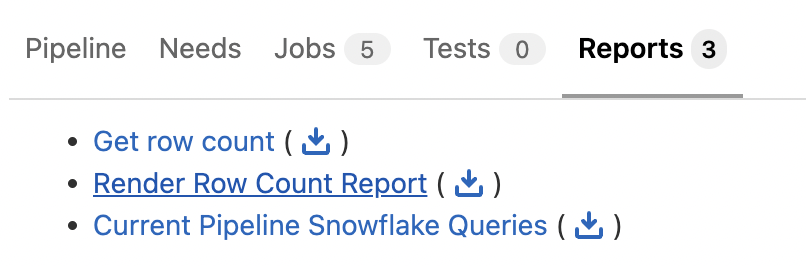
At the end of this third example, three reports are generated and listed in the Reports section:
The "Current Pipeline Snowflake Queries" report shows the following:
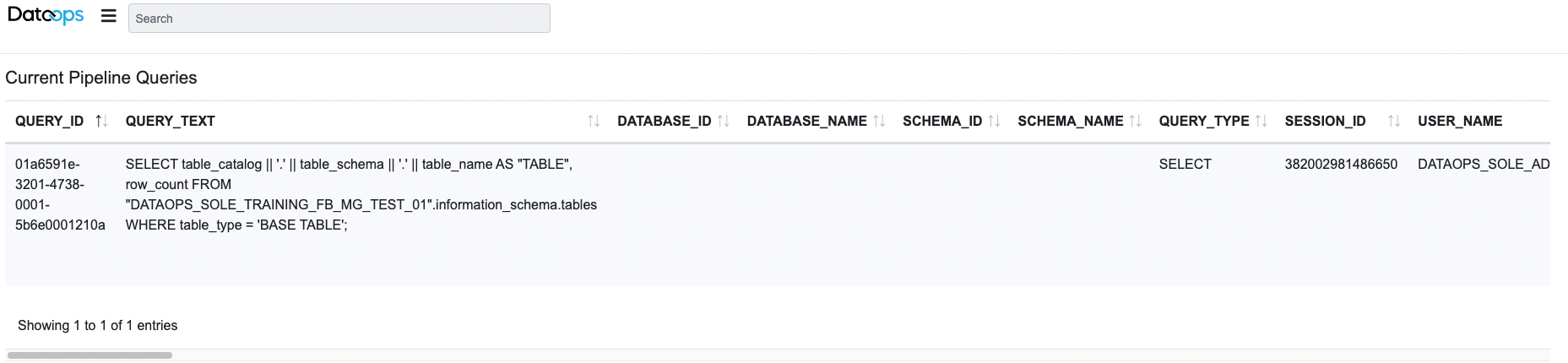
You can list useful information such as: QUERY_TAG, START_TIME, END_TIME, ROWS_PRODUCED, CREDITS_USED_CLOUD_SERVICES and many more useful stats.
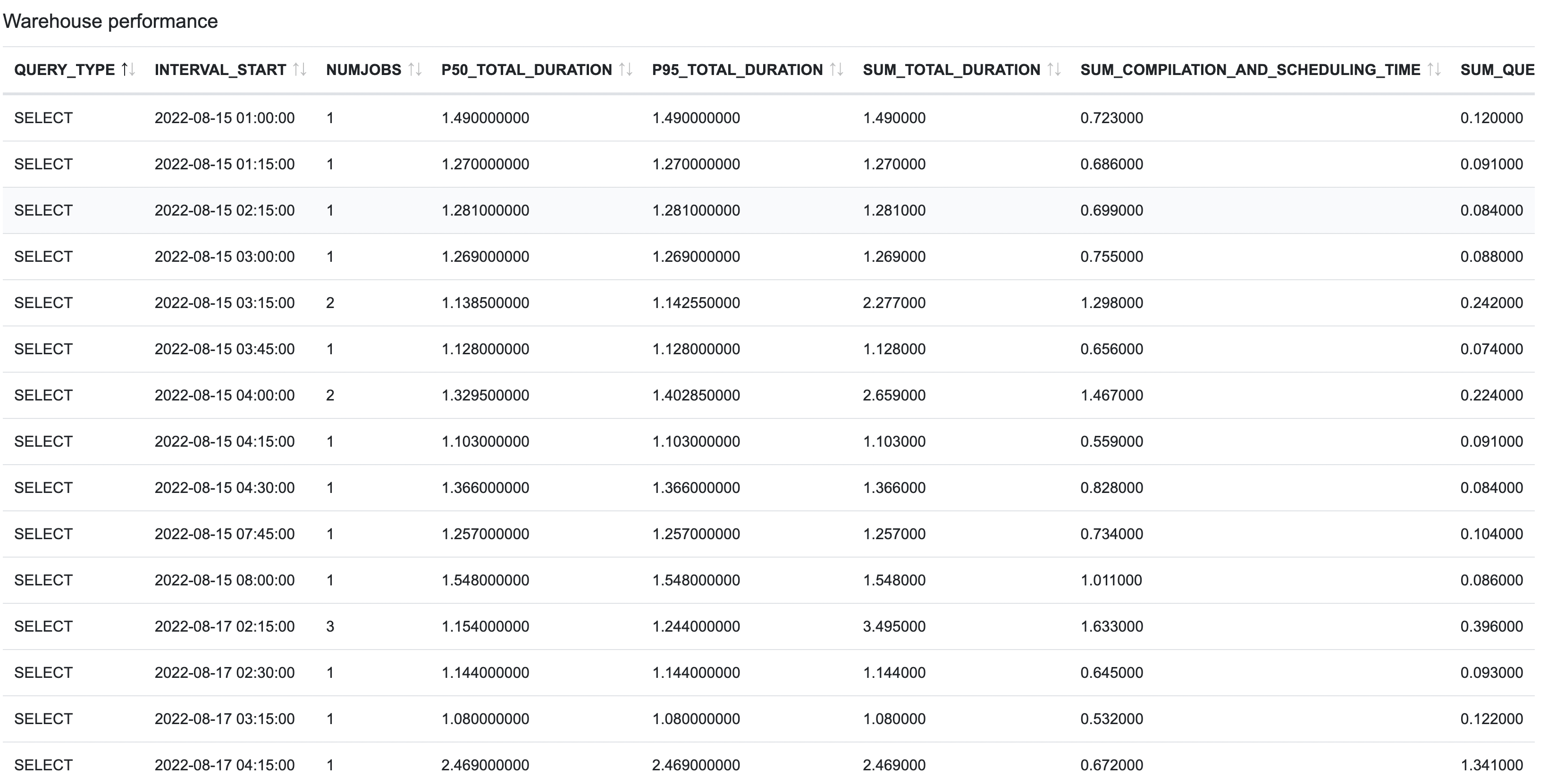
Snowflake warehouse performance
This example shows how you can create a report on all the Snowflake warehouses currently in use. The query displays the performance for the last 30 days. This example uses a custom query running against the database, in this case against snowflake.account_usage.query_history.
with
params as (
select
    current_warehouse() as warehouse_name,
    (current_date()-30) as time_from,
    current_date() as time_to
),

jobs as (
select
    query_id,
    time_slice(start_time::timestamp_ntz, 15, 'minute','start') as interval_start,
    qh.warehouse_name,
    database_name,
    query_type,
    total_elapsed_time,
    compilation_time as compilation_and_scheduling_time,
    (queued_provisioning_time + queued_repair_time + queued_overload_time) as queued_time,
    transaction_blocked_time,
    execution_time
from snowflake.account_usage.query_history qh, params
where
    qh.warehouse_name = params.warehouse_name
and start_time >= params.time_from
and start_time <= params.time_to
and execution_status = 'SUCCESS'
and query_type in ('SELECT','UPDATE','INSERT','MERGE','DELETE')
),

interval_stats as (
select
    query_type,
    interval_start,
    count(distinct query_id) as numjobs,
    median(total_elapsed_time)/1000 as p50_total_duration,
    (percentile_cont(0.95) within group (order by total_elapsed_time))/1000 as p95_total_duration,
    sum(total_elapsed_time)/1000 as sum_total_duration,
    sum(compilation_and_scheduling_time)/1000 as sum_compilation_and_scheduling_time,
    sum(queued_time)/1000 as sum_queued_time,
    sum(transaction_blocked_time)/1000 as sum_transaction_blocked_time,
    sum(execution_time)/1000 as sum_execution_time,
    round(sum_compilation_and_scheduling_time/sum_total_duration,2) as compilation_and_scheduling_ratio,
    round(sum_queued_time/sum_total_duration,2) as queued_ratio,
    round(sum_transaction_blocked_time/sum_total_duration,2) as blocked_ratio,
    round(sum_execution_time/sum_total_duration,2) as execution_ratio,
    round(sum_total_duration/numjobs,2) as total_duration_perjob,
    round(sum_compilation_and_scheduling_time/numjobs,2) as compilation_and_scheduling_perjob,
    round(sum_queued_time/numjobs,2) as queued_perjob,
    round(sum_transaction_blocked_time/numjobs,2) as blocked_perjob,
    round(sum_execution_time/numjobs,2) as execution_perjob
from jobs
group by 1,2
order by 1,2
)
select * from interval_stats
This SQL script is called by the following Reporting orchestrator job config:
"Warehouse performance":
  extends:
    - .agent_tag
  stage: "Generate Report"
  image: $DATAOPS_REPORTING_RUNNER_IMAGE
  variables:
    DATAOPS_REPORTER_ACTION: START

    ## template rendering parameters
    DATAOPS_TEMPLATES_DIR: "$CI_PROJECT_DIR/dataops/generic_reporter"
    # CSV web app template
    DATAOPS_SECONDARY_TEMPLATES_DIR: /render-utils/csv_html

    ## Run phase parameters
    # Executing the query from `DATAOPS_REPORTER_SNOWFLAKE_RUN_QUERY`
    DATAOPS_REPORTER_RUN_SCRIPT: /snowflake-utils/execute_query
    # Path to SQL query
    DATAOPS_REPORTER_SNOWFLAKE_RUN_QUERY: $CI_PROJECT_DIR/dataops/generic_reporter/warehouse_performance.sql

    ## Render phase parameters
    # Merge CSV with web app template
    DATAOPS_REPORTER_RENDER_SCRIPT: /render-utils/csv_to_html

    ## Credentials
    DATAOPS_REPORTER_RUN_SNOWFLAKE_ACCOUNT: DATAOPS_VAULT(SNOWFLAKE.ACCOUNT)
    DATAOPS_REPORTER_RUN_SNOWFLAKE_USERNAME: DATAOPS_VAULT(SNOWFLAKE.INGESTION.USERNAME)
    DATAOPS_REPORTER_RUN_SNOWFLAKE_PASSWORD: DATAOPS_VAULT(SNOWFLAKE.INGESTION.PASSWORD)
    DATAOPS_REPORTER_RUN_SNOWFLAKE_WAREHOUSE: DATAOPS_VAULT(SNOWFLAKE.INGESTION.WAREHOUSE)
    DATAOPS_REPORTER_RUN_SNOWFLAKE_ROLE: DATAOPS_VAULT(SNOWFLAKE.INGESTION.ROLE)
  script:
    - /dataops

  ## Report properties
  artifacts:
    name: "Warehouse performance last 30 days"
    when: always
    paths:
      - $CI_PROJECT_DIR/dataops/reports
    expose_as: "DataOpsReport"
  icon: ${REPORT_ICON}
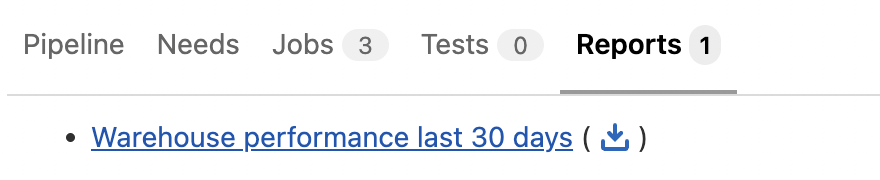
After running the job, you find and open the report here:
Clicking the report opens the details of the usage and query history: