VaultSpeed Orchestrator
Enterprise
| Image | $DATAOPS_VAULTSPEED_RUNNER_IMAGE |
|---|
The VaultSpeed orchestrator deploys your pre-configured VaultSpeed data vault into a Snowflake database.
Prerequisites
- VaultSpeed project created.
- The data vault in your VaultSpeed project meets the requirements described at the DataOps.live Integration documentation.
- VaultSpeed agent installed (needs to be running at the time of job execution).
Usage
The VaultSpeed orchestrator facilitates the deployment of a data vault designed in VaultSpeed into your Snowflake database while enabling scheduled loading of the vault.
You can use SOLE to create the Snowflake database where your data vault would be deployed. You can also use MATE to pick up after your business vault has been deployed to build additional models and tables, adhering at the same time to all DataOps.live principles and values.
Let's look at the code of a standard VaultSpeed pipeline as found in the DataOps Reference Project:
Configure VaultSpeed Manager:
  extends:
    - .agent_tag
  stage: Additional Configuration
  image: $DATAOPS_VAULTSPEED_RUNNER_IMAGE
  script:
    - /dataops
  variables:
    DATAOPS_VAULTSPEED_ACTION: GENERATE_CODE
    DATAOPS_VAULTSPEED_GENERATION_TYPE: SNOWFLAKEDBT
    DATAOPS_VAULTSPEED_PROJECT: my_vaultspeed_project_name
    DATAOPS_VAULTSPEED_URL: DATAOPS_VAULT(VAULTSPEED.URL)
    DATAOPS_VAULTSPEED_USER: DATAOPS_VAULT(VAULTSPEED.USER)
    DATAOPS_VAULTSPEED_PASSWORD: DATAOPS_VAULT(VAULTSPEED.PASSWORD)
    DATAOPS_VAULTSPEED_OUTPUT: vaultspeed/target
    DATAOPS_SNOWFLAKE_ACCOUNT: DATAOPS_VAULT(SNOWFLAKE.SOLE.ACCOUNT)
    DATAOPS_SNOWFLAKE_USER: DATAOPS_VAULT(SNOWFLAKE.SOLE.USERNAME)
    DATAOPS_SNOWFLAKE_PASSWORD: DATAOPS_VAULT(SNOWFLAKE.SOLE.PASSWORD)
    DATAOPS_SNOWFLAKE_ROLE: DATAOPS_VAULT(SNOWFLAKE.SOLE.ROLE)
    DATAOPS_SNOWFLAKE_WAREHOUSE: DATAOPS_VAULT(SNOWFLAKE.SOLE.WAREHOUSE)
    DATAOPS_SNOWFLAKE_DATABASE: ${DATAOPS_DATABASE} # The name of the database depends on your environment
  artifacts:
    paths:
      - fl_flow_config.yml
      - bv_flow_config.yml
      - ${CI_PROJECT_DIR}/scripts
      - ${CI_PROJECT_DIR}/${DATAOPS_VAULTSPEED_OUTPUT}

FL Flow:
  stage: Raw Transformation
  inherit:
    variables: false
  trigger:
    strategy: depend
    include:
      - artifact: fl_flow_config.yml
        job: Configure VaultSpeed Manager
  variables:
    DATAOPS_VAULTSPEED_ACTION: TRIGGER_FMC
    DATAOPS_SNOWFLAKE_ACCOUNT: DATAOPS_VAULT(SNOWFLAKE.SOLE.ACCOUNT)
    DATAOPS_SNOWFLAKE_USER: DATAOPS_VAULT(SNOWFLAKE.SOLE.USERNAME)
    DATAOPS_SNOWFLAKE_PASSWORD: DATAOPS_VAULT(SNOWFLAKE.SOLE.PASSWORD)

BV Flow:
  stage: Business Transformation
  inherit:
    variables: false
  trigger:
    strategy: depend
    include:
      - artifact: bv_flow_config.yml
        job: Configure VaultSpeed Manager
  variables:
    DATAOPS_VAULTSPEED_ACTION: TRIGGER_FMC
    DATAOPS_SNOWFLAKE_ACCOUNT: DATAOPS_VAULT(SNOWFLAKE.SOLE.ACCOUNT)
    DATAOPS_SNOWFLAKE_USER: DATAOPS_VAULT(SNOWFLAKE.SOLE.USERNAME)
    DATAOPS_SNOWFLAKE_PASSWORD: DATAOPS_VAULT(SNOWFLAKE.SOLE.PASSWORD)
The above example pipeline defines the orchestrator's logic, stages, and behaviors, respecting a given order:
-
The
Configure VaultSpeed Managerjob manages the data vault code generation, retrieval, and deployment. It starts by checking the state of the orchestrator to determine if this is the first or a consecutive run. The state can be eitherINITfor an initial run orINCRfor an incremental run, which is stored in the persistent cache of the runner. You can reset the state by passing a variable or deleting the cache from the runner. -
During an
INITrun, theConfigure VaultSpeed Managerjob executes the DDL (Data Definition Language) code generated by VaultSpeed for all objects of the data vault (schemas, tables, procedures, etc.) in Snowflake. Once the DDL execution is complete, it initiates the FMC (Flow Management Control) execution. -
During an
INCRrun, theConfigure VaultSpeed Managerskips the DDL execution and continues to the FMC execution. -
At the
Raw Transformationstage, we have theFL Flowjob, which executes the Foundation Layer (FL) Flows generated by VaultSpeed. We dynamically generate a separate child pipeline for each source, which will run the FL flow for that particular source.
Again, there are two types of behaviors here:
- An
INITrun triggers FL flow executions regardless of any set schedule. - An
INCRrun triggers FL flow executions based on a pre-determined schedule set in your VaultSpeed project. The value can be a string, i.e., "15 minutes", "1 hour 20 minutes" or a valid cron expression. Based on the schedule of each source, some FL flows are triggered and executed while others are skipped.
Here is an example of having two sources: source A, set to "update" every 15 minutes (schedule_interval: "15 minutes") and source B, set to "update" every 60 minutes (schedule_interval: "1 hour"). If you place your pipeline on a schedule of 15 minutes, in 4 consecutive runs of the pipeline, the FL flow of source A will run 4 times, and the FL flow of source B will run just once.
-
At the
Business Transformationstage, we have theBV Flowjob, which executes the Business Vault (BV) Flow generated by VaultSpeed. This always comes after completing all the jobs from theRaw Transformationstage. The same logic is followed: -
An
INITrun triggers the execution of the BV flow regardless of any set schedule. - An
INCRrun triggers the execution of the BV flow based on the scheduled interval. Again, some BV flow executions could be skipped depending on the configured schedule.
Here is an example of how the pipeline nodes look like and what they mean:
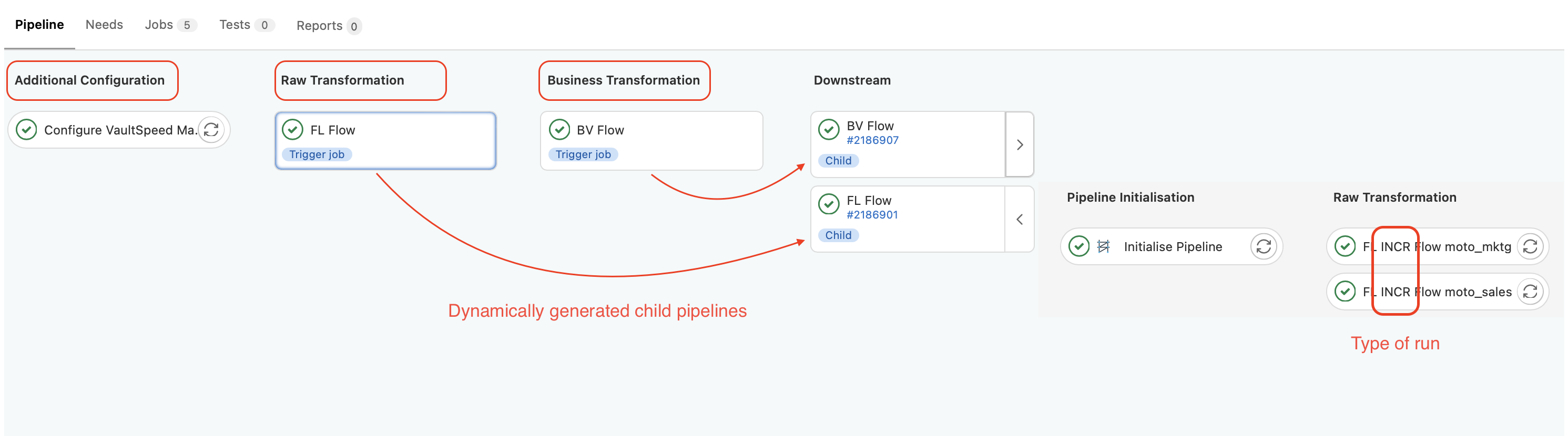 In the image above, you have two executing sources, and the type of run is
INCR. You can "unfold" child pipeline nodes on the right to see sub-jobs being run and read logs.
Delta code generations
The VaultSpeed orchestrator supports the deployment of both full and delta code generations. It is designed to automatically detect if there has been a new locked release of your data vault and generate the corresponding code. If a previous production release exists in your VaultSpeed project, the orchestrator generates only the delta code between the two releases and deploys it to your database. If there is no previous production release, the orchestrator generates the full code of the latest release and deploys it to your database.
In case of a delta code deployment, make sure that the previous production release has already been deployed to your database.
Environment management
With the VaultSpeed orchestrator, you can deploy multiple instances of your data vault across different environments. This simplifies the data vault development process, offering a dedicated environment where you can test your data vault changes before deploying them to your production environment.
To enable this feature, you must set the DATAOPS_VAULTSPEED_PRESERVE_ENVIRONMENT parameter to 1 in your
Configure VaultSpeed Manager job.
Also, you need a mandatory SOLE job that runs before your VaultSpeed jobs. Since all Snowflake objects will be created by the VaultSpeed orchestrator, you only need a minimalist database configuration for the SOLE job:
databases:

  "{{ env.DATAOPS_DATABASE }}":
    comment: This is the main DataOps database for environment {{ env.DATAOPS_ENV_NAME }}

    {% if (env.DATAOPS_ENV_NAME != env.DATAOPS_ENV_NAME_PROD and env.DATAOPS_ENV_NAME != env.DATAOPS_ENV_NAME_QA) %}
    from_database: "{{ env.DATAOPS_DATABASE_MASTER }}"
    data_retention_time_in_days: 1
    {% endif %}

    grants:
      USAGE:
        - READER
      CREATE SCHEMA:
        - WRITER
SOLE not only creates the database for the deployment of your production data vault but also clones the production data vault to your development environment if you run your pipeline in a feature branch.
Info
A feature branch is considered any branch that is not either of the following: master, main, production, prod,
qa, development, develop, dev.
If you want to create a copy of your production data vault in a different environment, you need to create a new feature
branch from your production branch and run your pipeline in this new branch. The SOLE job will then duplicate the production data vault
into your new environment, and the Configure VaultSpeed Manager job will automatically initiate an INCR-type run by default as the
data vault is already initialized.
Once you are done with your changes, you can merge your feature branch with your production branch, which will trigger a new
pipeline run in the production branch.
This time, the Configure VaultSpeed Manager job initiates an INIT-type run, forcing a new code generation to pull the latest changes from your VaultSpeed project and deploy them to your
production environment.
Supported parameters
| Parameter | Required/Default | Description |
|---|---|---|
DATAOPS_VAULTSPEED_URL |
REQUIRED | Pulled from the Vault — value is usually https://vaultspeed.com/api |
DATAOPS_VAULTSPEED_USER |
REQUIRED | Pulled from the Vault — value is your login email for VaultSpeed |
DATAOPS_VAULTSPEED_PASSWORD |
REQUIRED | Pulled from the Vault — value is your login password for VaultSpeed |
DATAOPS_VAULTSPEED_PROJECT |
REQUIRED | Your VaultSpeed project name |
DATAOPS_SNOWFLAKE_ACCOUNT |
REQUIRED | Your snowflake account |
DATAOPS_SNOWFLAKE_USER |
REQUIRED | Your snowflake user |
DATAOPS_SNOWFLAKE_PASSWORD |
REQUIRED | Your snowflake password |
DATAOPS_SNOWFLAKE_ROLE |
REQUIRED | Your snowflake role |
DATAOPS_SNOWFLAKE_WAREHOUSE |
REQUIRED | Your snowflake warehouse |
DATAOPS_SNOWFLAKE_DATABASE |
Optional - defaults to DATAOPS_DATABASE |
The snowflake database where your data vault resides |
DATAOPS_VAULTSPEED_ACTION |
Optional - defaults to GENERATE_CODE |
Is part of the logic setup to generate child pipelines |
DATAOPS_VAULTSPEED_DATA_VAULT_NAME |
Optional | Your dv_name from VaultSpeed project in case you have several |
DATAOPS_VAULTSPEED_DATA_VAULT_RELEASE |
Optional | The name of your Data Vault release in VaultSpeed - the last release is used by default |
DATAOPS_VAULTSPEED_BUSINESS_VAULT_RELEASE |
Optional | The name of your Business Vault release in VaultSpeed - the last release is used by default. Caution: You can use this parameter only if you set the corresponding DATAOPS_VAULTSPEED_DATA_VAULT_RELEASE. |
DATAOPS_VAULTSPEED_GENERATION_TYPE |
Optional | Can be omitted — currently only supported value is SNOWFLAKEDBT |
DATAOPS_VAULTSPEED_FORCE_GENERATION |
Optional | Force the generation of new code from Vaultspeed if any changes you have done are not coming up. This forces the INIT run. |
DATAOPS_VAULTSPEED_TYPE_OF_RUN |
Optional | Manually set up run to be INIT or INCR |
DATAOPS_VAULTSPEED_SKIP_SCHEDULE_CONTROLLER |
Optional | If set, the orchestrator will ignore the schedule interval set in VaultSpeed and always run the FMC flows |
DATAOPS_VAULTSPEED_PRESERVE_ENVIRONMENT |
Optional | Enables the automated management of multiple environments as described at the Environment management documentation |
Check this link for more information about the DataOps.live / VaultSpeed integration.
Key-pair authentication
VaultSpeed Orchestrator supports connecting to Snowflake using key-pair authentication. To learn how to configure it,
see the key-pair authentication documentation. If you want to use
key-pair authentication with this orchestrator, you need to set the key-pair authentication parameters for all three
job types: Configure VaultSpeed Manager, FL Flow, and BV Flow. For example:
Configure VaultSpeed Manager:
  extends:
    - .agent_tag
  stage: Additional Configuration
  image: $DATAOPS_VAULTSPEED_RUNNER_IMAGE
  script:
    - /dataops
  variables:
    DATAOPS_VAULTSPEED_ACTION: GENERATE_CODE
    DATAOPS_VAULTSPEED_GENERATION_TYPE: SNOWFLAKEDBT
    DATAOPS_VAULTSPEED_PROJECT: my_vaultspeed_project_name
    DATAOPS_VAULTSPEED_URL: DATAOPS_VAULT(VAULTSPEED.URL)
    DATAOPS_VAULTSPEED_USER: DATAOPS_VAULT(VAULTSPEED.USER)
    DATAOPS_VAULTSPEED_PASSWORD: DATAOPS_VAULT(VAULTSPEED.PASSWORD)
    DATAOPS_VAULTSPEED_OUTPUT: vaultspeed/target
    DATAOPS_SNOWFLAKE_ACCOUNT: DATAOPS_VAULT(SNOWFLAKE.SOLE.ACCOUNT)
    DATAOPS_SNOWFLAKE_USER: DATAOPS_VAULT(SNOWFLAKE.SOLE.USERNAME)
    DATAOPS_SNOWFLAKE_AUTH: KEY_PAIR
    DATAOPS_SNOWFLAKE_KEY_PAIR: DATAOPS_VAULT(SNOWFLAKE.SOLE.KEY)
    DATAOPS_SNOWFLAKE_ROLE: DATAOPS_VAULT(SNOWFLAKE.SOLE.ROLE)
    DATAOPS_SNOWFLAKE_WAREHOUSE: DATAOPS_VAULT(SNOWFLAKE.SOLE.WAREHOUSE)
    DATAOPS_SNOWFLAKE_DATABASE: ${DATAOPS_DATABASE} # The name of the database depends on your environment
  artifacts:
    paths:
      - fl_flow_config.yml
      - bv_flow_config.yml
      - ${CI_PROJECT_DIR}/scripts
      - ${CI_PROJECT_DIR}/${DATAOPS_VAULTSPEED_OUTPUT}

FL Flow:
  stage: Raw Transformation
  inherit:
    variables: false
  trigger:
    strategy: depend
    include:
      - artifact: fl_flow_config.yml
        job: Configure VaultSpeed Manager
  variables:
    DATAOPS_VAULTSPEED_ACTION: TRIGGER_FMC
    DATAOPS_SNOWFLAKE_ACCOUNT: DATAOPS_VAULT(SNOWFLAKE.SOLE.ACCOUNT)
    DATAOPS_SNOWFLAKE_USER: DATAOPS_VAULT(SNOWFLAKE.SOLE.USERNAME)
    DATAOPS_SNOWFLAKE_AUTH: KEY_PAIR
    DATAOPS_SNOWFLAKE_KEY_PAIR: DATAOPS_VAULT(SNOWFLAKE.SOLE.KEY)

BV Flow:
  stage: Business Transformation
  inherit:
    variables: false
  trigger:
    strategy: depend
    include:
      - artifact: bv_flow_config.yml
        job: Configure VaultSpeed Manager
  variables:
    DATAOPS_VAULTSPEED_ACTION: TRIGGER_FMC
    DATAOPS_SNOWFLAKE_ACCOUNT: DATAOPS_VAULT(SNOWFLAKE.SOLE.ACCOUNT)
    DATAOPS_SNOWFLAKE_AUTH: KEY_PAIR
    DATAOPS_SNOWFLAKE_KEY_PAIR: DATAOPS_VAULT(SNOWFLAKE.SOLE.KEY)